AI

Get FREE access to Google‘s Gemini, but using my dissertation and other focused YouTube education stuff! #notebooklm #teachers

Need a fresh perspective for your classroom? Watch as Google Champion Laurie Guyon shares three easy ways you can use Gemini as a thought partner to support your teaching goals!
Laurie shows us how she uses Gemini to:
Create fun new lessons and activities for the classroom.
Repurpose old lessons with fresh ideas to increase participation.
Get fresh perspectives to solve complex problems.
Watch more: https://www.youtube.com/playli....st?list=PLP7Bvyb3ap4

The 6-month long, C2k-run pilot using Gemini for Education in Northern Ireland has found that teachers can save up to 10 hours per week. This video takes you through firsthand experiences of how AI is empowering teachers and saving them valuable time, enabling them to deepen connections with their students and rediscover their passion for teaching.

Using Google Gemini brings a fresh approach to accessing texts for teaching writing. This AI tool allows educators to quickly generate text excerpts tailored to specific skills. These custom texts offer models for writing when a published text may not be accessible or when more options are needed.
Using mentor texts to teach the Six Traits of Writing gives students clear examples of what good writing looks like—exactly what we want them to emulate. For instance, a well-chosen text can demonstrate how a writer organizes ideas or uses vivid word choice to bring a story to life. Students can then turn around and apply these techniques in their own writing, learning firsthand how to implement the traits of writing.
Upcoming workshops💡👩🏫
→https://www.smekenseducation.com/get-started/
🔔 Subscribe to this channel: https://bit.ly/3rwOQHD
💡 Learn more about this topic: https://www.smekenseducation.c....om/teaching-with-tec
There are plenty of recommended mentor texts for teaching writing. However, the recommendations may not cater to individual teaching needs or be readily available. This is one instance where the integration of technology in education has opened up avenues for creating customized instruction.
Google Gemini along with other generative AI tools, such as ChatGPT, offer the advantage of customization and adaptability to specific instructional points, providing the flexibility that published texts may not. Most texts can show a skill, but the skill may not always be obvious, making it difficult for students to recognize. The ideal passage is concise but packed with solid examples. Teaching with technology, such as AI tools to create text excerpts, can help teachers better achieve this balance.
Pinpoint the instructional purpose of the mentor text
Using Google Gemini to create customized mentor texts is straightforward and user-friendly. The method for producing a mentor text, whether for reading or writing, follows the same steps (check it out here). The highlighted difference lies in the content.
When looking for a specific mentor text for teaching writing, educators typically examine texts to understand the author’s craft and the traits demonstrated. However, with Google Gemini, teachers do not have pre-existing texts to browse for these attributes. Instead, they need to provide these expected features to the AI tool. By specifying the desired genre, tone, target skills, and other relevant criteria, teachers guide Gemini to generate a mentor text that aligns with their instructional goals.
For this tech tool to be effective, the prompt has to be specific and detailed. If it is too vague, the mentor text might not showcase the skill as intended. The challenge is figuring out exactly which details to specify for Gemini.
While the 6 Traits are common across all types of writing, each mode—argumentative/persuasive, informative, and narrative—has unique characteristics that define its specific purpose and style. For instance, while the trait focus might be on ideas, the skill focus might differ—creating a plot for a narrative versus identifying a topic and position for persuasive writing.
Because several skills fall within each trait, it is best practice to rely on the skills outlined in the standards to guide instruction. Teachers can refer to the wording in the standards to direct Gemini in crafting texts that highlight these skills.
The prompt guide, skills organized by the traits, and sorted standards take the guesswork out of identifying which skills fit each trait and mode. Once the instructional purpose is clear, just follow the outline on the prompt guide to write the prompt for Gemini.
With the right prompt, Google Gemini can quickly generate a tailored mentor text that aligns with the instructional goals. If the initial text doesn’t hit the mark, it is simple to tweak the prompt and generate a new version. Fine-tune the prompt and the resulting mentor text until the resulting text perfectly aligns with the teaching objectives.
Using mentor texts in the classroom
With the mentor text on hand, there are plenty of ways to use it for teaching writing. Teachers can use the mentor text in mini-lessons to illustrate what good writing looks like. During small-group sessions, students can revisit the mentor text to work on their writing with support, using it as a model to practice the skill. It’s also valuable during writer-process conferences, where it can serve as a concrete example for teachers to reference to give feedback and guidance.
Learn more from Smekens: https://www.smekenseducation.com/
Free Teacher Tools: https://www.smekenseducation.com/teacher-tools-signup/
Google Gemini Masterclass 🔥| Prompt Engineering Course in Hindi | Basic to Advanced Gemini Tutorial!
Google Gemini Masterclass (Hindi) | Complete Prompt Engineering Course in Hindi | Prompt Engineering skills from Basic to Advanced | Prompt Engineering Pro Tips & Tricks | Basic to Advanced Gemini Tutorial
In this video, I’m going to teach you Prompt Engineering skills from Basic to Advanced, with a complete Google Gemini tutorial. Complete Prompt Engineering Course in Hindi, I’ll take you from scratch and cover everything about Prompt Engineering in a deep and practical way — so you’ll gain skills and knowledge that you won’t find in any single video out there.
You’ll learn all the key features of Google Gemini, along with Pro Tips & Tricks of Prompt Engineering — everything in one complete, easy-to-follow session that will level up your productivity like never before. And yes, I’ll show you many real-world use cases with multiple prompt examples, focusing only on what’s actually useful and relevant for you — whether you’re a student, college learner, engineer, working professional, or even a content creator. In short, this video is for everyone who wants to master Gemini and Prompt Engineering in the simplest and most practical way possible.
▶️ Must-Watch Video:
Prompt engineering Chapter 1: https://youtu.be/fdXB89WwtU0
What You'll Learn in This Masterclass (Highlights 🎥✨)
✓ PART 1: Google Gemini (Basic to Advanced)
• What is Google Gemini? (Next-Gen AI System)
• Gemini vs ChatGPT: Why is Gemini different? (Ecosystem Integration)
• Gemini Interface, Features, and Tools Explained
• AI Tools: Deep Research, Veo (Video), Image Generation, Canvas, Guided Learning
• Gem Manager (Create your own custom AI expert)
• Most Important Settings (Personal Context & Instructions)
✓ PART 2: Prompt Engineering (Basic Foundation)
• What is Prompt Engineering? (Simple explanation)
• Why are Prompt Engineering Skills Important?
• Normal Prompt vs. Engineered Prompt (Multiple Live Examples)
• The 5 Golden Rules of Prompt Engineering
• What is Generative AI and How Does it Work?
✓ PART 3: Practical Use Cases & Prompts
• Non-stop practical prompt examples
• Prompts for Content Creators & Students
• Prompts for Working Professionals, Coders & Developers
• Prompts for Teachers, Freelancers, and more
✓ PART 4: Advanced Prompt Engineering (Pro Tips & Tricks)
✓ PART 5: Q&A Segment - Future of AI
• Will AI Replace Your Job?
• AI Future and Career Opportunities
• Job Impact, AI Dangers, and Benefits of AI
...and so much more!
⌚ CHAPTERS | TIMESTAMPS :
00:00 What you'll learn in this Masterclass
01:09 Google Gemini Overview
02:19 Google Gemini Structure ( 5 Powerful Parts )
02:40 Part 1: Basic to Advance Google Gemini ( Introduction Part )
03:16 Part 2: Prompt Engineering Basic Foundation ( Most Important Part )
04:04 Part 3: Practical Use Cases & Prompts ( Most Important Part )
04:04 Part 4: Advanced Prompt Engineering Pro Tips & Tricks
04:40 Part 5: Q&A Segment - Future of AI ( Most Important Part )
05:13 Part 1: Basic to Advance Google Gemini ( Beginner to Pro )
06:20 What is Google Gemini? (Next-Gen AI)
07:33 Why Gemini? (Gemini vs ChatGPT)
08:58 Why Google Renamed Bard to Gemini
11:05 What Can Google Gemini Do? (Gemini's Main Capabilities)
11:42 Example No 1 ( Text-Related )
14:28 Example No 2 ( AI Image -Related )
15:31 Example No 3 ( AI Video -Related )
15:53 Example No 5 ( Coding & Programming -Related )
16:07 Example No 6 ( Files & Google Integration )
16:22 Example No 7 ( Complex Reasoning )
16:38 Example No 8 ( Research & Citations )
17:01 Gemini's Main Capabilities ( Intro )
17:31 Deep Understanding & Communication
18:11 Content Creation & Editing
18:34 Deep Research & Real-time Information
19:43 Learning & Study
21:11 Gemini's More Capabilities
21:28 Gemini Features & Tools (Interface Tour)
22:13 Important Setting: Personal Context & Instructions
24:34 Live Demo: Before vs. After Setting
24:37 Live Demo: Before
27:45 Live Demo: After Setting
30:54 AI Tool: Deep Research
31:29 AI Tool: Create Videos with Veo
31:35 AI Tool: Create Images
32:24 AI Tool: Canvas
32:40 AI Tool: Guided Learning
33:03 AI Tool: Gem Manager (Create Your Own Gem)
33:51 AI Tool: How to create Gem?
36:06 Gem Demo examples
38:01 Part 2: Prompt Engineering Basic Foundation
39:17 What is a 'Prompt' and 'Engineering'?
41:21 Why is Prompt Engineering Important?
43:50 Normal Prompt vs. Engineered Prompt (Live Examples)
44:06 Example: Content Creation (Scriptwriting)
46:58 Example: Resume Writing
48:42 Example: AI Image Generation (Thumbnail)
51:24 5 Golden Rules of Prompt Engineering
51:51 Rule 1: CLARITY
55:12 Rule 2: CONTEXT
01:00:25 Rule 3: COMMAND / ROLE
01:04:17 Rule 4: CONSTRAINTS
01:06:45 Rule 5: CREATIVITY
01:09:09 What is Generative AI?
01:10:11 What's Next? Important message (Part 3, 4, 5 Preview)
01:11:22 Final Summary & Thank You
✨ Tags ✨
prompt engineering,prompt engineering course,prompt engineering course in hindi
✨ Hashtags ✨
#promptengineering #googlegemini #ai #Gemini

In this video, we dive deep into how to use Google Gemini (formerly Bard) to revolutionize language teaching and learning. Whether you’re a professional educator looking to automate lesson planning or a polyglot-in-training seeking a 24/7 conversation partner, Gemini is the ultimate tool.
Prompt Engineering for Teachers: How to generate instant lesson plans, quizzes, and vocabulary lists.
Real-time Conversation Practice: Using Gemini Live to practice speaking and listening. Contextual Translations: Why Gemini beats standard translators by explaining why words are used.
Creative Content Generation: Creating bilingual stories, role-play scenarios, and cultural deep-dives. Image-to-Language Learning: Using Gemini’s vision capabilities to identify objects and describe scenes in your target language.
Stop spending hours on prep work and start using AI to create personalized, immersive experiences for your students. Google Gemini: gemini.google.com/

Ever wondered what the difference is between ChatGPT, Gemini, Claude—and all those AI tools made just for teachers? In this episode of Teachers AI Café, I break down the big three AI engines and explain what “wrappers” are (no, not the musical kind).
You’ll learn:
The strengths of ChatGPT, Gemini, and Claude
• What teacher tools like Diffit, Gamma.app, MagicSchool.ai, Brisk, and Eduaide are really doing behind the scenes
• Why these platforms often start free… but don’t stay that way
• How to get similar results using the free versions of the main AI platforms—if you know how to prompt
Whether you’re brand new to AI or curious about saving time without getting stuck behind a paywall, this episode will help you make sense of what’s what—and where to start.
So grab your cuppa, take a breath, and let’s figure this out together. ☕🤖
Website: learnaiquickly.com (https://learnaiquickly.com)
Subscribe the the newsletter for podcast cheatsheets (https://yugen-learning.kit.com/a028a6f4f4)
Find the YouTube version of this here (https://www.youtube.com/playli....st?list=PLf_k_to1rig
Go to this Facebook group (https://www.facebook.com/group....s/learnaiforteachers to access the cheatsheet
https://www.facebook.com/group....s/learnaiforteachers
Email: kane@learnaiquickly.com
Bought to you by: https://learnaiquickly.com/

How To Create Flashcards In Google Gemini (Working 2026)
how to create flashcards in google gemini,google gemini flashcards tutorial,google gemini tutorial,create study flashcards with google gemini,ai study tools,google ai tools,how to use google gemini,google gemini tips and tricks,ai content creation,google gemini features,ai tools for creators,study with ai,google gemini guide,ai learning tools,ai education assistant

Explore the potential of artificial intelligence in special education! A step by step guide on how to use Google Gemini's Storybook feature and empower special educators to create highly personalized social stories. We'll walk through the creation of a story for a Grade 2 student, featuring his favorite 'Star Wars' character 'Baby Yoda or Grogu', to help him understand the importance of taking turns in our life.
A personalized social story for a child in Grade 2 on 'turn-taking'. Learn how to harness AI to craft engaging, age appropriate and relevant stories that support social-emotional growth and address specific behavioral needs in your classroom.
This video is a must-watch for special educators looking to create personalized, impactful, social stories that resonate with your students.
00:00 Concerns
00:37 A good Solution?
01:47 Traditional Sources|Social Stories
02:36 Latest Sources|AI & Social Stories
03:16 Gemini|Log In
04:10 Storybook Feature
04:41 Storybook Prompt
05:44 Story|Higher Pitched Voice
08:09 Story|Lower Pitched Voice
10:47 Closing Remarks
Series: Using AI Tools like Gemini Storybook to create Personalized Social Stories:
Part 1 - Turn Taking (Step by Step Tutorial): https://youtu.be/LzF54JYch4E
Part 2 - Managing Screen Time: https://youtu.be/LYQWCZmpUtQ
Good Websites for Social Stories:
Picture Books: https://www.booksie.org/
Audio Books: https://librivox.org/
Picture Books: https://autismlittlelearners.c....om/social-stories-fo
Audio Video Presentations: YouTube
Dear Educators,
- To endless possibilities: This is just one way of utilizing the storybook feature, put on your 'Creative Hat' and explore different ways to use it! We would enjoy watching your ideas in action too.
- Figure out a way to involve your student in the process of creating the story book (it could be in the form of creating the artwork or character for the story, deciding the theme or moral for the story, or style of art for the story book).
- Don't expect your student to fall in line after 1 or 2 renditions of the personalized social story generated by you. Bringing about behavioral change is a slow and intuitive process. Be patient with your student or kid. Top it up with other activities. Model the desired behavior regularly too.
- Try not to share your or your kid's or student's real photos and personal details with AI powered tools.
- Please overlook my screen recorders struggle to capture my screen without shivering!
Dear #google, I have the following suggestions for #gemini #storybook feature (since it is in its experimental stage!):
1. Wouldn't it be better if the attribution under the title of the storybook says, "Created by ABC using Gemini Storybook"?
2. Please figure out a way to credit or acknowledge and quote sources used by the AI model to generate the story book (similar to the manner in which your AI powered search engine, now, links or quotes sources).
3. Provide us with an option to download the digital version of the story book as a .mp4 file.
4. When we save the file as a PDF instead of printing it, ensure the illustrations corresponding to the write-ups (lines from the story) are on the same page (as it appears in the digital/online version of the storybook).
Credits|Sources:
- Google Gemini: Storybook Keyword or Feature or Gemstone
- Images: https://www.aiimagegenerator.org
- Pictures: Canva
- BGM: www.soundful.com
Please Note (as of 05.09.2025):
- Gemini's Storybook Feature, which is in its experimental stage, attributes the prompt writer as the author of the story book generated by it. As someone, who believes in the power of words, our heart goes out to original creators, writers and illustrators on whose ideas, style and artwork the generated output is based upon (which would have been a part of the data set used train the AI model). We are hopeful, as we move forward in time, Google will figure out a way to credit or acknowledge and quote sources used by the AI model to generate the story book. So that we can use this cool feature in a transparent and credible manner.
- The length of the illustrated storybook created by Gemini is 10 pages.
#aitools #personalized #socialstories #specialeducation #inclusiveeducation

How to Create a Test from Scratch with Gemini AI - FOR MATH TEACHERS - Use Prompts to Generate Tests
In this video, I demonstrate how to use Gemini AI to generate a math test on a given math topic.

Transforming Teaching & Learning with Google Gemini
📅 18 December 2025
🕓 4.30 PM – 6.00 PM
📍 Online | Free Registration
On 19th Dec,2025 Session is for Higher Education Faculties Register Here - https://forms.gle/5nENAzTSPP3Kcd92A
Join this focused professional development session designed for educators and institutions exploring the practical use of AI in teaching and learning. The session will demonstrate how Google Gemini can be effectively integrated into classroom practices to enhance outcomes while maintaining responsible and ethical use of AI.
This session will help your teachers to:
* Simplify daily teaching tasks using AI tools
* Design personalized and engaging lesson plans
* Promote critical thinking and higher-order learning among students
* Use AI responsibly and meaningfully in classrooms
🎓 Google Participation Certificate provided
Feedback Form: https://forms.gle/xN69m8Sfacw3LHvr8

https://educertifications.google/
#gemini #education #educator
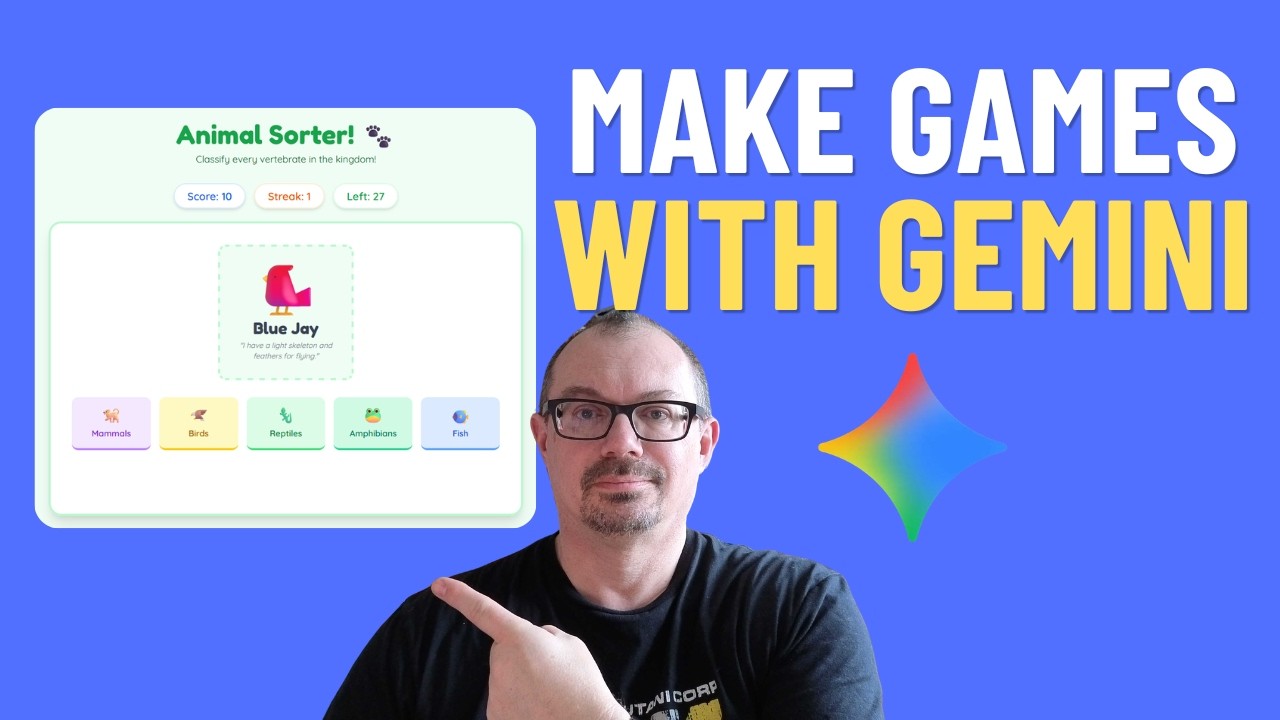
Discover how to create a fully functional interactive game using Google Gemini, all without writing a single line of code! This tutorial showcases the power of gemini ai and its canvas gemini feature, making game development accessible to everyone. Learn to build your own engaging experiences with these incredible ai tools.
The video covers
- How to enable and use Gemini Canvas for app building.
- Prompting techniques for educational games.
- How to refine your app with scoring systems and sound effects.
- Sharing your creation with your students or colleagues.
Play the game here: https://gemini.google.com/share/e6e249e82637
https://www.whiteboardblog.co.....uk/2026/04/make-your

Welcome to our first Learn with Google for 2026
Explore the advanced capabilities of Gemini, NotebookLM, and Gemini in Google Workspace now that these are more widely available
Discover how Google’s generative AI tools can be used to personalise learning, support students with any special needs, and create more engaging learning experiences.

In this video we explore the 27 free Gemini AI tools that Google recently made available for educators.
0:01:05 - 🔗 Accessing the AI Tools
0:01:59 - 🛠️ Types of AI Tools
0:02:28 - 📋 "Template" Tools
0:04:00 - 💯 Example - Generate a Quiz
0:08:53 - 💬 "Gemini Prompt" Tools
0:10:32 - 🧪 Example - Brainstorm a Science Lab Experiment
0:17:52 - 🏁 Conclusion
➡️ For written directions about accessing and using these tools, see my blog post here:
https://www.controlaltachieve.....com/2025/09/27-free-
Stay connected and access all of my other resources - https://bit.ly/caa-connect
🧰 Eric’s EdTech blog - https://www.controlaltachieve.com
📧 Email - ericcurts@gmail.com
▶️ YouTube - https://youtube.com/ericcurts
📮 Join the "Control Alt Achieve" email discussion group - https://bit.ly/caa-emailgroup
💬 Join the "Control Alt Achieve" Facebook group - https://bit.ly/caa-fb
📰 Sign up for my weekly email newsletter - https://bit.ly/curts-news
🔔 Get new blog posts automatically through email - https://follow.it/control-alt-achieve?leanpub
📗 "Control Alt Achieve" book - https://bit.ly/curts-books
🏫 Bring me to your school, organization, or conference with over 70 PD sessions to choose from - https://bit.ly/curts-pd

🎓 Level Up Your Teaching with a FREE Gemini Certification! 🚀
Ready to upgrade your teaching skills using the power of AI? This video will guide you through how to get your FREE Gemini Certification and show you how it can transform the way you teach, plan lessons, and engage students.
✨ What you’ll learn in this video:
What the Gemini Certification is all about
How teachers can use Gemini AI in the classroom
tips to get certified for FREE
Real benefits for educators, trainers, and content creators
Whether you’re a teacher, tutor, or educator looking to stay ahead in the digital age, this certification is a must-have. Don’t miss this opportunity to level up your teaching and enhance your professional credentials—at no cost!
👉 Watch until the end and start your Gemini Certification journey today!
Disclaimer: This post may include affiliate links and I may earn a small commission for every successful order, at no extra cost to you. No clickbait / no harmful software in the link provided.
#GeminiCertifiedEducator
#GoogleGemini
#FreeCertification
#GoogleForEducation
#AIforTeachers
#EducatorsPH
#TeacherLife
#AIEducation
#DigitalTeacher
#EdTechPH
#OnlineLearning
#TeacherTools
#GeminiAI
#FreeOnlineCourse
#AITraining

🚀 How to Use Gemini 3.0 Pro Better Than 99% of Educators
Are you still using Google Gemini like a simple chatbot? In this video, I’ll show K-12 teachers, university professors, and instructional designers how to unlock the real power of Gemini 3.0 Pro to automate grading, supercharge lesson planning, conduct deep academic research, and create stunning visuals — all in minutes, not hours.
Gemini 3.0 Pro comes with a 2 million token context window, advanced Thinking Mode, Deep Research, multimodal data extraction, and Interactive Canvas — making it the most powerful AI assistant ever built for education.
This step-by-step tutorial shows you exactly how to use it like a pro, not a beginner.
⏱️ TIMESTAMPS – Learn Fast, Skip Smart
00:00 – Educator’s New Superpower
00:31 – Thinking Mode for Pedagogical Reasoning
01:07 – Multimodal Paperwork Hack (Handwritten & PDF Data)
01:32 – Deep Research for Curriculum Design
02:05 – Socratic Tutor Prompt (Stop AI Cheating)
02:50 – Video Analysis for Lessons & Quizzes
03:24 – Nano Banana Visual Pedagogy (AI Diagrams)
04:47 – Gmail & Drive Integration (Admin Automation)
05:15 – Productivity Evolution Summary
🎯 What You’ll Learn in This Video
✔ How to use Thinking Mode for complex teaching strategies
✔ How to convert handwritten student work into structured grading data
✔ How to use Deep Research to build citation-based curriculum
✔ How to turn Gemini into a Socratic Tutor instead of an answer machine
✔ How to analyze long YouTube lectures automatically
✔ How to generate labeled diagrams using Nano Banana AI
✔ How to live-edit rubrics and documents using Interactive Canvas
✔ How to connect Gemini with Gmail & Google Drive
🧠 Perfect For:
• School Teachers
• College Professors
• EdTech Trainers
• Curriculum Designers
• Instructional Designers
• Academic Researchers
• Online Course Creators
📌 Why This Matters
Most educators waste hours doing work AI can do in seconds.
This video shows you how to evolve your classroom workflow using Gemini 3.0 Pro so you can:
✅ Save 5–10 hours every week
✅ Reduce admin workload
✅ Improve lesson quality
✅ Support student learning ethically
✅ Become an AI-powered educator
📢 Call to Action
👍 Like this video if you love smart teaching tools
💬 Comment “GEMINI” if you want my prompt templates
🔔 Subscribe to Tech Tools for Educators for weekly AI strategies
📤 Share this with one teacher who needs this today
AI tools for teachers
AI in education
AI lesson planning
EdTech tools for educators
Digital teaching tools for schools
AI for universities
AI classroom automation
Gemini 3.0 Pro tutorial
How to use Gemini for teachers
Google Gemini AI for education
Best AI tools for educators
AI lesson planning
AI grading assistant
AI research for teachers
Socratic tutoring with AI
Gemini Deep Research
Gemini Interactive Canvas
Google Gemini 3.0 Pro for Teachers – Full Pro Tutorial
This Gemini AI Trick Saves Teachers 10+ Hours a Week
Gemini 3.0 Pro: The Ultimate AI Tool for Educators in 2026
Stop Using Gemini Like a Beginner (Teacher’s Guide)
Gemini AI for Teachers – Advanced Prompts & Automation
I Tested Gemini 3.0 Pro for Teaching… Mind Blowing
How Smart Teachers Use Gemini 3.0 Pro in 2026
Gemini 3.0 Pro Tutorial for Educators (Full Workflow)
STOP USING GEMINI WRONG
99% OF TEACHERS MISS THIS
GEMINI PRO FOR TEACHERS
AI FOR SMART TEACHERS”
SAVE 10 HOURS / WEEK
How to Unlock gemini 3.0's Full Potential with These Settings.
The Right Way to Use Gemini AI for Education
#googlegemini #techtoolsforeducators #aiforteachers
🔗 Stay Connected:
Subscribe for more
https://www.youtube.com/@Techt....oolsforeducators?sub
Follow us
https://ig.me/m/techtoolsforeducators
Chat with us
https://www.whatsapp.com/chann....el/0029VaqTkXC5kg7ES
Connect with us
https://t.me/techtoolsforeducators
Like Us
https://www.facebook.com/profi....le.php?id=6155123843
Email Us
govindarajakariappa@gmail.com
If you have any issues and needed help, please comment below!
Don't forget click Subscribe!
Tip Trick (TT) is a professional Channel to provide the best solutions and technical skills. We are providing a complete solution and technique for all people needed to perform specific tasks. We give the same level of attention no matter what or who you are. What tech skills do employers want to see on resumes today? Tip Trick is to help you to become an IT expert in your career. The vision of Tip Trick (TT) is to help you succeed and reach your goal.
Need an AI lesson builder? AI rubric creator? Just an AI partner? There are a lot of AI teacher tools out there... but did you know you can BUILD YOUR OWN using Google Gemini? When you create your own AI Teacher Tool then the only person collecting your data is YOU!
Google Gemini for Education is your AI partner built right into your Gmail, Docs, Sheets, Slides, Google Classroom, etc... Use https://gemini.google.com and Gems in Gemini to upload your files and information about your district initiatives and teaching style to have a custom AI Teacher Tool.
BUT.... you still have to create the prompts... and who has time for that?! So I prompted my idea to create my own custom AI Teacher Tool. In this video Alice Keeler demonstrates using Google Gemini to vibe code creating an Add-on for Google Sheets that lets you choose from a list of teacher tools, like you can in other 3rd party tools, but you have total control over the prompt!
More safe, more secure, more personalized. Google Gemini for Education.

Discover how Google's latest AI models are transforming the classroom. This session will focus on the new Gemini integration in Google Classroom, showing you how to generate quizzes, create customized rubrics, and differentiate content for students in seconds. Learn how to use this powerful tool as a thought partner to streamline your workflow and make learning more personalized.

🎓 Transform Lesson Planning with Gemini Canvas | AI for Teachers
Tired of spending hours making slides? ✨ Meet Gemini Canvas — your new AI-powered assistant that helps teachers create beautiful, engaging slideshow presentations in minutes.
In this video, we’ll show how Gemini Canvas turns your lesson ideas into ready-to-use classroom slides. Perfect for busy educators who want to focus more on teaching and less on design!
💡 What you’ll learn:
How Gemini Canvas instantly generates complete lesson presentations
Tips for customizing slides to fit your teaching style
Real classroom use cases where AI saves time and boosts creativity
Why AI tools like Gemini are changing the future of education
📚 Join the AI for Teachers movement!
👉 Subscribe for more classroom AI tools, tutorials, and inspiration.
👉 Share this video with a fellow teacher who loves tech!
#AIForTeachers #GeminiCanvas #GoogleGemini #AIEducation #EdTech #TeachingTips #LessonPlanning #AIClassroom #TeacherTools

In the 5th edition of our AI in 30 series we explore Gems in Google Classroom. Learn how to create Gems right in Google Classroom and attach Gems to assignments.
In the 5th edition of our AI in 30 series we explore Gems in Google Classroom. Learn how to create Gems right in Google Classroom and attach Gems to assignments.

How to create a storybook with Gemini. Ever wondered if you could turn your child's drawing or a family photo into a fully illustrated, narrated storybook? In this video, we do just that! I'm giving you a complete tutorial and review of Google's incredible new tool, Gemini Storybook, and showing you how to unleash its creative power.
Join me as I walk through four unique, hands-on demos to create personalized AI kids' stories from scratch. We'll explore all the best features, from uploading your own media (like kids' art and even academic papers!) to choosing from dozens of illustration styles and creating stories in multiple languages. Whether you're a parent looking for endless bedtime stories, an educator trying to simplify complex topics, or just a creative person who loves to tell tales, this Gemini Storybook guide is for you!
✨ In This Gemini Storybook Tutorial, We Will:
✅Turn a child's crayon drawing into a 3D Claymation adventure.
✅Create a gentle story to help kids with real-life challenges.
✅Transform a complex science paper (and photos!) into a fun cartoon a 7-year-old can understand.
✅Turn a family vacation photo into a printable, interactive coloring book!
0:00 - Intro: The Magic of AI Storybooks!
0:53 - Demo 1: Turning My Son's Art into a Claymation Story
3:56 - Demo 2: Creating a Story for Life's Challenges
5:28 - Demo 3: Science Paper & Photos to a Kids' Adventure!
7:32 - Demo 4: Family Photo to a Printable Coloring Book!
10:47 - Final Thoughts & The Amazing Multi-Language Feature

Google Gemini 3 can do something for English leaners that I haven't seen any other tool do, and I think it could be a big deal.
✅ Check out the 90-day program:
https://www.lukepriddy.com
Get a free English course:
https://www.lukepriddy.com/naturalconversations
____
Listen to the audio:
https://anchor.fm/cloud-english
Other links:
linktr.ee/lukepriddy
____
#learnenglish #english #americanenglish
