Latest videos

Como usar o Gemini IA para Planejar Aulas em Minutos! 🚀 (Guia para Professores)
Conteúdo da Descrição:
Você se sente sobrecarregado com o planejamento de aulas e a criação de materiais didáticos? Neste vídeo, eu vou te mostrar o passo a passo de como transformar o Gemini, a inteligência artificial do Google, no seu maior aliado na educação!
O Gemini não serve apenas para tirar dúvidas; ele é capaz de estruturar planos de aula completos, criar questões de prova, sugerir dinâmicas de grupo e até adaptar textos para diferentes níveis de ensino.
O que você vai aprender hoje:
📝 Como criar um Plano de Aula alinhado à BNCC em segundos.
💡 Ideias criativas de atividades práticas e metodologias ativas.
✍️ Geração automática de listas de exercícios e gabaritos.
📧 Dicas para automatizar a comunicação com pais e alunos.
🛠️ Prompts (comandos) prontos para você copiar e usar.
A tecnologia chegou para facilitar a vida do docente, permitindo que você foque no que realmente importa: o processo de ensino-aprendizagem e o contato com seus alunos.
Para dar visibilidade aos seus vídeos sobre o uso do Gemini na educação, o ideal é usar uma mistura de hashtags amplas (para alcance) e específicas (para o público certo).
Aqui estão as melhores opções divididas por categorias:
PROMPT AULA DE EXCELÊNCIA
Aja como um Professor Especialista e Pedagogo com vasta experiência em Ensino Fundamental II e Médio na rede estadual. Seu objetivo é criar um Plano de Aula detalhado, engajador e alinhado à BNCC (e Currículo Paulista, se aplicável).
Por favor, elabore o planejamento com base nos seguintes dados:
DADOS DA AULA:
- Disciplina: [INSERIR DISCIPLINA, EX: HISTÓRIA]
- Ano/Série: [INSERIR SÉRIE, EX: 2º ANO DO MÉDIO]
- Tema/Conteúdo Central: [INSERIR TEMA, EX: ERA VARGAS]
- Quantidade de Aulas: [EX: 2 AULAS]
- Tempo por aula: [EX: 45 MINUTOS CADA]
- Perfil da Turma: [EX: AGITADA, GOSTA DE VÍDEOS, OU DIFICULDADE EM LEITURA]
- Habilidades/Códigos BNCC: [INSERIR CÓDIGO OU ESCREVA "SUGIRA AS HABILIDADES PERTINENTES"]
- Tipo de Atividade Desejada: [EX: DEBATE, QUIZ, MAPA MENTAL, LISTA DE EXERCÍCIOS]
ESTRUTURA DE SAÍDA OBRIGATÓRIA:
O plano deve conter, nesta ordem:
1. CABEÇALHO:
- Título da Aula
- Objetivos de Aprendizagem (Claros e mensuráveis)
- Habilidades da BNCC/Currículo trabalhadas.
2. ORGANIZAÇÃO DO TEMPO (Cronograma detalhado minuto a minuto):
- Acolhida/Introdução (Como captar a atenção inicial).
- Desenvolvimento (Explicação do conteúdo + Metodologia ativa).
- Atividade de Fixação (A parte prática).
- Encerramento/Sistematização (Como fechar o tema).
3. CONTEÚDO TEÓRICO RESUMIDO:
- Os principais tópicos que o professor deve abordar na lousa ou slide.
4. DETALHAMENTO DA ATIVIDADE:
- Instruções passo a passo da atividade para os alunos.
- [SE FOR EXERCÍCIO] Crie 5 questões com gabarito comentado.
- [SE FOR DINÂMICA] Explique as regras e materiais necessários.
5. ADAPTAÇÃO E RECURSOS:
- Sugestão de materiais (lousa, data show, celular, papel).
- Uma sugestão de adaptação para alunos com dificuldades de aprendizagem ou inclusão.
Use uma linguagem clara, direta e encorajadora para o professor.
🚀 Foco em Inteligência Artificial e Gemini
#GeminiAI
#GoogleGemini
#IAnaEducacao
#InteligenciaArtificial
#IAparaProfessores
#FerramentasDigitais
🍎 Foco em Prática Docente
#PlanejamentoDeAula
#DicasParaProfessores
#VidaDeProfessor
#ProfessorCriativo
#AulasInovadoras
#GestaoEscolar
🎓 Foco em Educação e Tecnologia (EdTech)
#EdTech
#TecnologiaEducacional
#InovacaoNaEducacao
#MetodologiasAtivas

🎓 **The Google Gemini AI Tool for Teachers: An Introduction** 🌟
Welcome to **Tech Tools for Educators**, where we explore cutting-edge tools to enhance teaching and learning! In this video, we dive into **Google Gemini**, the groundbreaking AI tool designed to transform the way educators teach and students learn. #getmoreviews #latestupdate #seo #goviral
💡 Learn how Google Gemini can:
- Save you time with automated lesson planning.
- Enhance student engagement with interactive content.
- Provide personalized learning experiences for every student.
- Simplify administrative tasks like grading and reporting.
Whether you're a seasoned teacher or just starting out, this AI tool will revolutionize your classroom! 🚀
🔗 **Resources Mentioned:**
[https://gemini.google.com]
💬 Let us know in the comments how you plan to use Google Gemini in your teaching! Don’t forget to like, subscribe, and hit the notification bell 🔔 to stay updated on more tech tips for educators.
**Hashtags:**
#GoogleGemini #EdTech #Teachers #ArtificialIntelligence #ClassroomInnovation #AIforEducation #TechTools #Educators #LessonPlanning #21stCenturyTeaching Dive deep into the exciting world of AI-powered learning with our "Best AI Tools for Students in 2025" playlist! This collection of videos explores a range of cutting-edge tools designed to enhance student learning, boost productivity, and foster a love of learning.
In this playlist, you'll discover:
AI-powered note-taking and organization tools to streamline information gathering and improve study habits.
Personalized learning platforms that adapt to individual learning styles and pace.
AI writing assistants to improve essay writing, research, and creativity.
AI tutoring and coaching tools for personalized support and academic guidance.
Innovative tools for STEM learning, including AI-powered problem-solving and data visualization.
This playlist is perfect for:
Educators seeking innovative ways to integrate AI into their classrooms.
Students looking to enhance their learning experience with the power of AI.
Parents interested in exploring AI tools to support their children's education.
Subscribe to our channel for more videos on educational technology, AI in education, and the future of learning.
Keywords:
AI for education
AI in the classroom
educational technology
edtech
student success
online learning
remote learning
AI learning tools
AI study tools
AI education tools
best AI for students
top AI tools for students
AI for students 2025
future of learning
AI education 2025
student productivity
AI and education
AI in the classroom 2025
Hashtags:
#AIforEducation
#EdTech
#FutureofLearning
#StudentSuccess
#AILearning
#OnlineLearning
#RemoteLearning
#AIinEducation
#EducationTechnology
#StudentLife
#BackToSchool
#StudyTips
#ProductivityTips
#TechTrends
#Innovation
🔗 Stay Connected:
Like us on Facebook: https://www.facebook.com/profi....le.php?id=6155123843
Connect on LinkedIn: linkedin.com/in/govindaraja-kariyappa-328503257
Chat with us on Whatsapp: https://www.whatsapp.com/chann....el/0029VaqTkXC5kg7ES
Chat with us on Telegram: https://t.me/techtoolsforeducators
Unlock the Power of AI in Education! 🚀
Tired of spending hours on lesson planning and grading? Google Gemini is here to revolutionize your teaching! 🤯
In this video, I'll show you how to harness the power of this cutting-edge AI tool to:
Save Time: Automate tasks like generating lesson plans, creating quizzes, and providing personalized feedback.
Enhance Learning: Create engaging and interactive learning experiences that cater to every student's needs.
Boost Creativity: Spark innovation in your classroom with AI-powered brainstorming and idea generation.
Don't miss out on this educational revolution! Click the link below to watch the full video and discover how Google Gemini can transform your teaching practice.
#GoogleGemini #AIinEducation #EdTech #TeacherTips #FutureofEducation #TechToolsForEducators
Keywords: Google Gemini, AI, education, edtech, teacher, lesson planning, grading, personalized learning, classroom technology, future of education, educational technology, tech tools for educators

ESL test: I put ChatGPT, Gemini and Copilot head-to-head. Who explains the Present Simple more accurately and more interactively? Watch my classroom test.
I’m an ESL teacher testing three major AI assistants: ChatGPT, Google Gemini, and Microsoft Copilot, to see how well each explains the Present Simple to beginner learners. I evaluated accuracy, clarity, examples, and interactive scaffolding (questions, practice prompts, error correction). If you teach English or are learning, this video shows which AI gives classroom-ready explanations and which ones need a teacher’s touch.
#ESL #PresentSimple #AIinEducation


Confused about which AI tool you should be using? You're not alone. CoPilot, ChatGPT, Claude, Gemini—they all have different strengths, weaknesses, and rules for the classroom.
This video breaks down the four biggest AI tools, giving you a straightforward comparison so you can choose the right one for your specific needs—whether you're building a lesson plan, diagnosing a vehicle, or writing a report.
✅ In this ultimate AI showdown, you will learn:
* Microsoft CoPilot: Why it's the only AI officially licensed for many classrooms and where it excels.
* ChatGPT: The creative workhorse for curriculum development and diagnostic help.
* Claude: The "thoughtful academic" perfect for reading long service manuals and documents.
* Google Gemini: The visual specialist that integrates with Google Workspace.
Stop guessing and start using the right tool for the job. We'll cover the pros, cons, and best use cases for each, so you can work smarter.
👇 Which AI tool has helped YOU the most so far? Drop your winner in the comments!
🔔 Like and Subscribe for more honest breakdowns of AI tools for the trades and the classroom!
#AIinEducation #ChatGPT #MicrosoftCopilot #GoogleGemini #ClaudeAI #EdTech #AutomotiveTechnician #TeacherTips

Build a custom AI Tutor with Google Gems to protect the "struggle" of learning.
🎓 Learn how to design pedagogical AI that asks questions instead of just giving answers.
AI doesn't have to ruin critical thinking in the classroom. In this video, I’ll show you exactly how to use GoogleGems to build a custom AI coach that aligns with your teaching philosophy. For any subject at any level, you can "architect" a tool that scaffolds challenges and guides students toward owning their own learning.
📥 RESOURCES MENTIONED:
The 4 Pillars of AI Design (PDF Guide): https://thetownsquare.org/resources
Try the "Supportive Math Coach" for Algebra 2: https://gemini.google.com/gem/....10Dqk_TDzjZgyBdx3BAe
Try the "Supportive Math Coach" for Pre-Calculus: https://gemini.google.com/gem/....1-LCD2VGQALMHlR-M1ld
Math Coach System Instructions: https://thetownsquare.org/resource-library
Watch: Prompt Engineering for Teachers: https://youtu.be/GxlOoKI0zxg
📍 TIMESTAMPS:
----------
0:00 Intro
0:54 Demo (math AI)
2:33 Demo (English & Language Arts)
4:22 How to Build Your Own AI
5:28 Use Gemini to write instructions
6:32 Pillars to guide your build
8:01 Finalize the build
6:45 What to Expect in this Series
8:27 Most important concept
----------
💡 WHAT YOU’LL LEARN:
How to turn Gemini into an "eager student teacher" with specific guardrails.
The difference between a "helpful" AI and a Socratic tutor.
Strategic "Chain-of-Thought" prompting to improve AI responses.
💬 JOIN THE TOWN SQUARE COMMUNITY:
www.thetownsquare.org
What is the #1 friction point in your classroom that a Custom Gem could solve? Drop your ideas in the comments—I’d love to help you brainstorm your instructions!
🔔 SUBSCRIBE for more AI tools, tips, and tricks designed specifically for educators

🚨 QUER APRENDER INGLÊS DE VERDADE?
Chega de métodos complicados e que não funcionam!
Com esse curso, você vai aprender inglês de forma simples, prática e eficiente — mesmo começando do zero.
🌎 Fale inglês com mais confiança
💼 Abra novas oportunidades de trabalho
✈️ Viaje sem depender de tradutor
👉 Comece agora:
https://go.hotmart.com/W94836618T
💡 Ideal para quem:
✔ Nunca estudou inglês
✔ Tem dificuldade em aprender
✔ Quer evoluir rápido
🔥 Não perca mais tempo — comece hoje sua jornada no inglês!
#ingles #aprenderingles #fluencia #english #estudos Você já imaginou criar histórias mágicas e personalizadas para seus alunos em questão de segundos? 📚✨
Nesta vídeo aula completa, eu vou te ensinar como dominar o Google Gemini (a poderosa Inteligência Artificial do Google) para transformar a maneira como você planeja suas aulas. Do nível básico ao avançado, você vai aprender a gerar narrativas que engajam, ensinam e encantam crianças de todas as idades.
O que você vai aprender neste vídeo:
🤖 O que é o Google Gemini e como acessá-lo de forma gratuita.
✍️ Engenharia de Prompts: Como dar as instruções certas para a IA criar histórias sob medida.
🎨 Personalização Total: Como incluir os nomes dos seus alunos, temas específicos da BNCC e realidades locais nas histórias.
📋 Planos de Aula Criativos: Ideias práticas para usar essas histórias em atividades de interpretação, escrita criativa e interdisciplinaridade.
🚀 Dicas Avançadas: Recursos que vão do simples texto até a complexidade de roteiros pedagógicos completos.
A Inteligência Artificial não veio para substituir o professor, mas para ser a sua maior aliada na economia de tempo e na inovação pedagógica!
📢 Redes Sociais e Contato:
Se você gostou dessa aula e quer continuar inovando na educação, não esqueça de:
✅ Se inscrever no canal para não perder as próximas ferramentas.
👍 Deixar seu Like para que esse conteúdo chegue a mais professores.
🔔 Ativar o sininho de notificações.
📸 Instagram: [@matheus.educacao]
🌐 Site Oficial: [https://www.vedu.com.br]
🔎 Tags (Palavras-chave para o Algoritmo):
#InteligenciaArtificial #IAnaEducação #GoogleGemini #ProfessorModerno #PlanodeAula #HistoriasPersonalizadas #TecnologiaEducacional #EdTech #DicasParaProfessores #BNCC
Stop grading and start mentoring! 🤖 Discover how to use Gemini Gems to automate student guidance for Empowerment Technology & the Quarter 2 MELCs.
In this tutorial, I'm showing you the exact workflow I used to create an "AI Project Coach" that stays within DepEd standards and helps students independently master ICT for Social Change. No more repeating instructions 50 times!
This video is a complete walkthrough for teachers exploring Artificial Intelligence in Education (AIEd). We focus specifically on the Empowerment Technology curriculum, covering:
ICT as a platform for Social Change
Developing Rich Multimedia Content
Analyzing Traffic Data (Reach & Virality)
Digital Citizenship & MIL Standards
💬 TEACHER CHAT: Are you using AI in your classroom yet? Let’s share ideas in the comments!
🔔 SUBSCRIBE for more AI-for-Teachers tutorials and EdTech hacks.
#EmpowermentTechnology #GeminiGems #AIforTeachers #DepEd #EdTech2026 #ICTforSocialChange #MIL #DigitalLearning #GoogleForEducation

Explore and download my customisable teacher templates for FREE!
https://www.primaryedtech.com/downloads
See how you can introduce AI to your students:
https://youtu.be/cF0TB29qI2g
Transform your teaching with Gemini for Google Workspace! This video explores how AI can supercharge your lessons, planning, and communication using tools you already love.
1:07 Meet
2:14 Gmail
3:05 Docs
3:56 Slides
4:57 Sheets
6:52 Classroom
https://www.youtube.com/playli....st?list=PLP7Bvyb3ap4
Learn more about Gemini for Google Workspace
https://edu.google.com/workspa....ce-for-education/add
20+ ways to use Gemini in education
https://docs.google.com/presen....tation/d/1M_6fXvxJRx
Get started with Gemini for Google Workspace (Online course)
https://skillshop.exceedlms.co....m/student/path/11780
Prompting Guide 101
https://services.google.com/fh..../files/misc/gemini-f
Discover how embedded AI features can empower educators to:
Streamline lesson planning: Create engaging content faster with AI-powered suggestions and resources.
Enhance communication: Foster better connections with students and parents using AI-driven insights and personalized messaging.
Boost productivity: Automate routine tasks and optimise your workflow with AI assistance.
Stay organized: Keep track of everything with AI-powered organisation tools.
Whether you're a seasoned educator or just starting out, Gemini for Google Workspace can help you take your teaching to the next level.
📷 Follow me on Instagram: https://instagram.com/primaryedtechproject
🐦 Follow me on X: https://x.com/Primary_EdTech
💼 Connect with me on LinkedIn: https://www.linkedin.com/in/steve-m-446ab1291/
#gemini #google #workspace #education #educators #teachers #lessons #planning #communication #workflow #productivity #organization #ai #artificialintelligence #embedded #integrated #empower

Gemini Converts PDF into Full PPT from One Prompt 😳 | New Update for Teachers!
नमस्ते Teachers 👋
अगर आप भी PDF से PPT Slides बनाने में Time Waste करते हैं — तो अब ये Problem खत्म!
इस Video में मैं दिखाने वाला हूँ कि Google Gemini के New Update 2025 से अब आप सिर्फ एक Prompt देकर किसी भी PDF को Full Presentation (PPT) में बदल सकते हैं — वो भी कुछ ही Minutes में 😱
🎓 Perfect for:
✅ Teachers preparing Class Notes
✅ Online Educators creating Slides
✅ Students making Projects or Seminars
✅ Content Creators & Coaches
इस Video में आप सीखेंगे 👇
Gemini का नया “PDF to PPT” AI Tool कैसे काम करता है
Step-by-Step Process to Convert Any PDF into Slides
Smart Prompts for Teachers & Educators
Free Hacks to Design Professional PPTs in Minutes
💡 बस एक Prompt डालो — और पूरा PPT Ready!
Gemini आपके लिए automatically Text, Layout aur Design तैयार कर देगा।
👉 Watch till the end to see Live Demo + Free Prompt Template!
Online Teaching के लिए मेरा बना बनाया हुआ PowerPoint Template अपनाएं और अपना कीमती समय बचाएं !
Download Link: https://creatorclassroom.myinstamojo.com
It's effortless to use, saving you valuable time while providing professional design PowerPoint themes. 🌟
दोस्तों Educational YouTube चैनल शुरू करने की जानकारी लेना हो या कोई चीज बनबाना हो LOGO, Banner, Course Banner, Social Media Post, PPT, PDF, E-Book, THUMBNAIL etc. या Live Classes के लिए OBS Setup, MS Office, Video Editing के लिए Camtasia Software Install करना हो या किसी तरह की Technical सहायता चाहिए तो आप मुझे कॉल कर सकते हैं !
TALK WITH US AT
GET IN TOUCH: https://linktr.ee/creatorclassroom
Contact us at: creatorclassroomhelp@gmail.com
WhatsApp: +91-8877583535
Don’t forget to subscribe!
Product Link जो मई use करता हूँ
लैपटॉप :https://ekaro.in/enkr20231020s38728410
Mic:https://ekaro.in/enkr20231020s38728608
ग्राफ़िक्स पेंनटेब: https://ekaro.in/enkr20231020s38728686
वेबकैम :https://ekaro.in/enkr20231020s38728811
Ringlight:https://ekaro.in/enkr20231020s38728859
कुछ खास वीडियो लिंक्स:
1st. पावरपॉइंट में क्विज़ एनिमेशन कैसे बनाएँ: https://youtu.be/x23ATk5fyaM
2nd. YouTube पर पढ़ाने के लिए बेस्ट PDF कैसे बनाएँ: https://youtu.be/NeMZo2n5s_g
3rd. पीडीएफ से PPT बनाने का आसान तरीका : https://youtu.be/YRwOOCia7VI
4th. OBS Studio से स्क्रीन रिकॉर्डिंग कैसे करें: https://youtu.be/5QElMPQPPgg
5th. एजुकेशनल चैनल बनाने का आसान तरीका : https://youtu.be/sYIbnxvngdg
6th YouTube पर videos अपलोड करने का आसान तरीका : https://youtu.be/IKwwDaYcf7E
7th: आपके जैसा YOUTUBE पर Videos बनाने के लिए क्या करना पड़ेगा? : https://youtu.be/k9wK6sQl9SI
#CreatorClassroom #GoogleGemini #GeminiUpdate #AIPPT #AIEducation #PDFtoPPT #OnlineTeaching #GeminiForTeachers #GeminiAI #TeachingTools #CreatorClassroom#TeachingMethods #TeachingTools #EngagingVideos #AnimatedQuiz #MCQPPT #ऑनलाइनटीचिंग #यूट्यूबटीचर #पावरपॉइंटटिप्स #OBSStudio #टीचिंगटूल्स
Disclaimer:-
Copyright Disclaimer Under section 107 of the Copyright Act of 1976, allowance is made for “fair use” for purposes such as criticism, comment, news reporting, teaching, scholarship, education, and research. Fair use is permitted by copyright statutes that might otherwise be infringing.
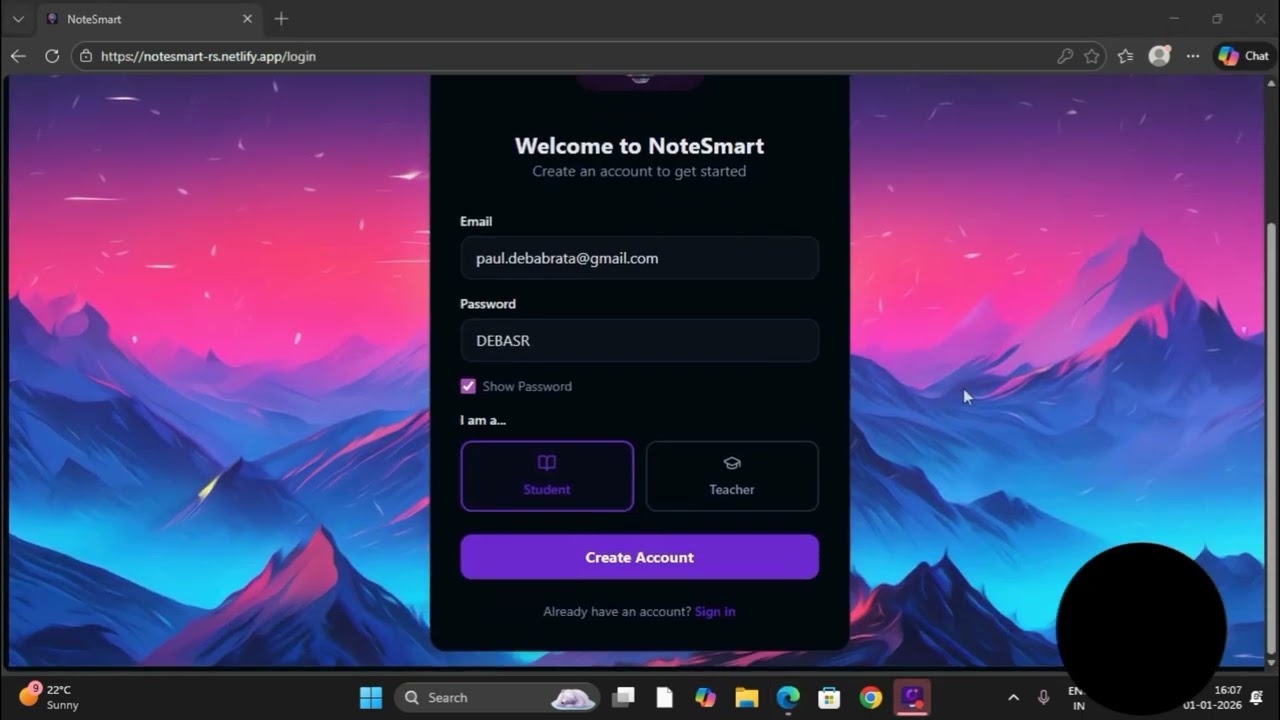
📚 NoteSmart – One Smart Platform for Teachers & Students
NoteSmart is a complete digital learning platform where teachers and students can interact seamlessly in one place. Teachers can upload PDFs and study materials, and students can access all those PDFs from a single, organized platform.
With the integration of Gemini Assistant, learning becomes smarter and faster. Students can ask doubts directly while studying. Simply enter the question number from any uploaded PDF, and Gemini Assistant will provide the correct answer along with a clear, easy-to-understand explanation.
No need to switch between apps or search elsewhere. Notes, PDFs, doubt-solving, and interaction—all in one platform.
NoteSmart is built to make learning simple, interactive, and intelligent for both teachers and students.
#NoteSmart #SmartLearning #EdTech #AIinEducation #GeminiAssistant #DigitalEducation #OnlineLearning

#belajareradigital
Ingin belajar dengan GRATIS baik untuk GURU, SISWA, atau MAHASISWA. Cukup subcribe channel ini [ https://www.youtube.com/c/BelajarEraDigital ] dan nyalakan tanda loncengnya.
Sebagai bentuk penghargaan bagi kami. Untuk lebih bersemangat menghadirkan materi-materi pembelajaran yang berkualitas.
Bagi yang ingin mengikuti pelatihan bersertifikat 46 JP, silahkan klik : [ https://bit.ly/MemberNewPack ]
Follow sosial media kami
Link presensi:
Mari bergabung dalam komunitas Belajar Era Digital (BED) untuk mendapatkan informasi berbagai kegiatan pengembangan kompetensi guru
Follow sosial media kami:
Website resmi: belajareradigital.com
Chanel Telegram : https://t.me/eventBED
Chanel Youtube Guru Era Digital : https://www.youtube.com/c/BelajarEraD...
Channel whatsapp: https://whatsapp.com/channel/0....029VaDtySoHltYEC5zO2
Instagram: instagram.com/belajarera.digital
______________________________________________
Mari jadi guru pembelajar dan berperan ✨
#belajareradigital
#belajarasyik
Silahkan bagikan sebanyak-banyaknya info ini agar bermanfaat bagi banyak orang

YOU are WORTH so much MORE! TIME to MOVE FORWARD!!
Timestamp
Intro - 0:00
Reading 0:45
⚠️Be aware of SCAMMERS ⚠️
I will not approach you for a PAID reading, PLEASE don't be scammed in the COMMENTS section!
For Personal readings please message me through - Facebook - www.facebook.com/empressintuitive
Or Website - www.empressintuitive.co/
Music is VALENTINE love piano solo 823923 by ZOMAP
Disclaimer: This reading is for entertainment purposes only and you are in CONTROL of your own life and decision making.
Cards I use- mystic dreamer tarot by Heidi Darras and Barbara Moore. The Rider Waite tarot by Pamela Coleman Smith.
#lovereading #tarot #tarotreading #empress #collectivereading #intutivetarot #abundance #intuitive #general #dm #df #emperor #tarotreadings #love #gemini #geminilovetarot #geminilove

In this video, I demonstrate how Google Gemini AI can be effectively used by language teachers to make teaching more interactive, creative, and student-centred.
You will learn step-by-step how to use Gemini AI for:
✅ Vocabulary building activities
✅ Auto-generation of quizzes and worksheets
✅ Creating digital & manual scrapbooks
✅ Enhancing reading, writing, and creative expression
✅ Saving teachers’ time with smart AI prompts
This session is especially useful for school teachers, B.Ed / M.Ed students, teacher educators, and language instructors who want to integrate AI tools in teaching-learning processes as recommended in NEP 2020.
🔹 Who should watch this video?
• Language Teachers (English, Hindi, Marathi, Sanskrit, etc.)
• Teacher Educators & B.Ed Students
• ICT in Education Enthusiasts
• Educators exploring AI tools for classrooms
🔹 Topics Covered:
• Gemini AI basics for teachers
• AI-based vocabulary enrichment
• Quiz & question paper creation
• Scrapbook ideas using AI
• Classroom examples & prompts
👉 Don’t forget to Like, Share, and Subscribe to Instructional TechEducation for more videos on AI tools, digital pedagogy, and innovative teaching methods.
#GeminiAI
#AIToolsForTeachers
#LanguageTeaching
#VocabularyLearning
#QuizCreation
#ScrapbookActivity
#AIInEducation
#NEP2020
#DigitalTeaching
#TeacherTraining
#ICTInEducation
#InstructionalTechEducation
Sigues usando el chat de IA solo para pedir texto? Google Gemini ha cambiado las reglas del juego con su nueva "Vista Dinámica". En este video, te muestro cómo esta actualización transforma tus prompts en presentaciones visuales, esquemas interactivos y tablas comparativas en cuestión de segundos.
Como "Profe IA", puse a prueba esta herramienta con 4 casos reales que puedes aplicar en el aula mañana mismo. Desde resumir libros de 500 páginas hasta convertir un video de YouTube en una clase lista para proyectar.
📋 EN ESTE VIDEO APRENDERÁS: 00:00 Introducción: La actualización de Gemini que lo cambia todo 00:39 Caso 1: Explicando conceptos complejos (IA para Docentes) 03:15 Caso 2: Creación de recursos didácticos de Matemáticas (Combinatoria) 05:12 Caso 3: Resumen visual de libros PDF (Ecología) 07:00 Caso 4: Convertir videos de YouTube en presentaciones (Historia) 08:15 Conclusiones: ¿Vale la pena para educadores?
🚀 HERRAMIENTAS MENCIONADAS:
Google Gemini (Versión con Vista Dinámica)
💡 SI ERES DOCENTE, ESTO TE INTERESA: La Inteligencia Artificial no viene a reemplazarte, viene a liberarte de la carga administrativa para que puedas enfocarte en lo humano: conectar con tus estudiantes.
CONECTA CONMIGO EN REDES SOCIALES: 📸 Instagram: @Profeiaenelaula 🎵 TikTok: @Profreiaenelaula 📧 Contacto/Negocios: profeiaenelaula@gmail.com
🔔 ¡No olvides SUSCRIBIRTE y activar la campanita para no perderte ninguna herramienta educativa!
#InteligenciaArtificial #GoogleGemini #Educacion #ProfeIA #EdTech #Docentes #VistaDinamica #TutorialGemini #InnovacionEducativa

Contact us for Google Workspace licensing: https://www.logicwing.com/contact-us
In this 1-hour webinar, we explore how Gemini, Google’s generative AI assistant, can transform the way educators teach, collaborate, and manage their digital classrooms. Whether you're new to Gemini or looking to deepen your understanding, this session is packed with practical tips and live demos tailored for schools and districts using Google Workspace for Education.
Who Are We:
We are LogicWing, Inc., an MWBE, IT services company specializing in educational technology for 18 years. We've done work across the U.S. but are particularly familiar with the way New York and Florida education systems operate.
Being Google Workspace for Education Partners for 15 years, we are experts at implementing Google Workspace in schools at any stage of your tech journey and will consult with you to see which option is the best fit for the best price.
What We Do for Schools:
Google Workspace licensing, migrations, consulting, admin console audits, and managed services (for small schools who need a Google Workspace expert on their team). When you buy licenses from us, we also offer training and professional development.
Learn more: https://www.logicwing.com
Where to Find Us:
Contact us: https://www.logicwing.com/contact-us
Subscribe to our Newsletter: https://www.logicwing.com/subscribe-to-our-newsletter
LinkedIn: https://www.linkedin.com/company/logicwing/
Instagram: https://www.instagram.com/logicwing/
Chapters:
00:00 Intro: Who we are
01:00 Agenda
01:51 Overview of Google AI tools in education
03:27 Introduction to the Gemini App
05:59 Google AI privacy and security
07:33 How to write an effective prompt in the Gemini App
11:29 Overview of how students can use Gemini
13:44 Is Gemini safe for teen students to use?
14:56 Student use of Gemini examples
17:31 What is Gemini Canvas and how can students use it?
20:18 Practice questions for 18+ students
21:06 Gemini App Audio Overviews (podcasts) for 18+ students
22:05 What is Gemini Deep Research?
23:19 What are Gemini Gems?
24:02 What is NotebookLM and what is the difference between NotebookLM and NotebookLM Plus?
25:55 How can teachers use NotebookLM?
27:37 NotebookLM demo: Sources, Chat, and Audio Overview (podcast)
37:15 How is Google's NotebookLM different from ChatGPT?
38:24 Does Gemini work in multiple languages?
39:09 More ways to use NotebookLM
40:08 Can I share my NotebookLM workspace / notebook?
40:31 NotebookLM exercise
41:00 Gemini for Google Workspace paid features overview: Gemini Advanced and NotebookLM Plus
42:42 What are Gemini Education and Gemini Education Premium?
44:04 Visual overview of Gemini for Google Workspace functionality
44:50 Where to find Gemini in Google Docs, Gmail, Slides, Sheets, and Drive
46:24 How to use Gemini to improve personalized learning
47:20 Gemini in Google Classroom
48:52 Can Gemini Education can create lesson plans tailored to grade level?
49:33 Can Gemini Education create quizzes?
50:16 Can Gemini Education re-level text for reading levels?
50:52 Can Gemini Education build vocabulary lists?
51:35 Wrap up discussion: How can you use these tools in your work life?
53:02 Top Gemini questions answered
53:16 What’s the pricing model of Gemini for Google Workspace?
53:45 Is Gemini Ed Law 2d compliant in New York State?
54:23 Ideas for incorporating Gemini into Google Workspace?
54:41 What is the best way to train teachers on Gemini?
55:57 Thank you - How LogicWing can help you

10 cara mudah untuk dapatkan Gemini Certified Educator secara percuma
#GeminiCertifiedEducator #DasarPendidikanDigital #CikguFarhana

Unlock career-boosting opportunities in 2025!
In this video, I break down Google’s brand-new FREE Gemini Certifications designed exclusively for students, teachers, educators, and freshers.
You'll learn:
✨ 1. Google Gemini Educator Certification
For teachers who want to upgrade with AI, digital teaching, and Google tools.
✨ 2. Google Gemini University Student Certification
For college students & freshers to build AI + digital skills with a globally recognized certificate.
💯 Both certifications are 100% FREE for a limited time — don’t miss it!
📘 What’s covered in this video?
✔ Step-by-step enrollment process
✔ Exam pattern, MCQs, passing score, certificate preview
✔ How to complete the certification faster
✔ How to showcase it on LinkedIn & Resume
✔ Bonus Opportunities:
🎯 Data Analyst Bootcamp (Python, Excel, Power BI, Tableau, GenAI)
🎯 CENTA TPO Program for Teachers (International recognition + rewards up to ₹1,00,000)
These opportunities can transform your career in 2025 — watch till the end and use all the official links below.
🔗 Official Links (Mentioned in Video)
• Gemini Educator Certification → https://edu.google.com/intl/AL....L_us/learning-center
• Google AI Student Tools → https://grow.google/students/
• Gemini for Education Overview → https://edu.google.com/intl/AL....L_us/ai/gemini-for-e
• AI Course for Educators → https://grow.google/ai-for-educators/
👥 Who should watch this video?
• College students & freshers
• Teachers, educators & trainers
• Job seekers aiming for AI/Data roles
• Anyone who wants free, verified Google certifications
👍 Support the channel
✔ Like the video
✔ Share with your friends
✔ Subscribe for more free certifications & career updates
✔ Comment your questions — I’ll reply personally
🔍 SEO Keywords (High Ranking)
google gemini free certification 2025
google educator certification free 2025
google university student certification
gemini ai certification for teachers
free google courses with certificates
google ai for students 2025
best free courses for beginners 2025
data analyst bootcamp 2025
centa tpo program teachers 2025
free online certificates for students
free ai certification 2025
career opportunities for students and teachers
google gemini training free
google professional certificates 2025
🔥 Hashtags (Boost Reach)
#GoogleGemini #GoogleCertification #FreeGoogleCourses #GoogleTraining #EducatorCertification
#StudentCertification #FreeCourses2025 #CareerUpdates #Teachers #Freshers #DataAnalystCourse
#AIForEducation #JobReadySkills #TechCareers2025 #FreeCertificate

Learn how to create an AI-generated photo using Gemini and make it talk using Pippit — step by step!
⚠️ Ethical Reminder:
Please don’t use real photos of yourself or your students. Always generate safe, AI-created images to protect privacy and promote responsible AI use.
🔹 Tools used in this video:
Gemini (for photo generation)
Pippit (for AI talking animation)
🎯 Perfect for teachers, students, and creators learning about ethical AI use in education.
#AI #Gemini #Pippit #AIEducation #EthicalAI #DigitalSafety

The art of teaching is the art of assisting discovery." — Mark Van Doren
AI Talk — When Gemini Walked Into My Classroom
In this AI Talk episode, the teacher shares how Gemini Pro transforms classroom teaching. With the @ integration, YouTube summarization, and lifelike voice features, lesson prep becomes faster and more interactive. Custom GEMs — from teaching assistants to writing helpers — act as true co-teachers, saving time and boosting creativity. Gemini isn’t just an AI tool; it’s a partner that empowers educators to teach smarter and inspire students more deeply.
本集《AI Talk》分享使用 Gemini Pro 的教學經驗。透過 @ 整合功能、YouTube 摘要與自然語音,教師能快速備課、建立雙語教材,節省時間又提升課堂互動。自訂 GEM 角色更像共教夥伴,協助規劃、寫作與創作。Gemini,不只是 AI,更是啟發教學創新的夥伴。

🚀 Free AI Course for Beginners – Class 6
Welcome to Class 6 of our FREE Artificial Intelligence Course, where we learn about Google Gemini and one of its most exciting models — Nano Banana, explained in the simplest and most beginner-friendly way.
👉🏻AI Course Playlist: https://youtube.com/playlist?list=PLTukPelH6ee59Kt9WLEcR5Yea9uFZTuiO&si=8wlF0FMweB3j7YSt
👨🎓 Who Should Watch This Class?
Absolute beginners in AI
Students & college learners
Content creators
Freelancers & professionals
Anyone curious about Google AI tools
👉 No coding required
👉 No prior AI knowledge needed
📅 Free AI Course Progress
📍 Class 1: What is AI?
📍 Class 2: Large Language Models (LLMs)
📍 Class 3: Machine Learning & Algorithms
📍 Class 4: How to Write Better Prompts
📍 Class 5: How to Use ChatGPT
📍 Class 6: Google Gemini & Nano Banana (This Video)
👍 Like the video if Gemini feels easy now
📌 Subscribe for daily AI classes
📤 Share this with friends starting AI
🔍 SEO Keywords (Beginner & High-Search)
google gemini explained
nano banana model
google gemini for beginners
what is nano banana ai
google ai tools
gemini ai tutorial
free ai course
ai for beginners
Music : Epidemic Sound : https://share.epidemicsound.com/3qnmDP
SFX: Multiple Sources
🙏Huge thanks to all the Creative Artists for the inspiration and also for the Stocks 😊
✅Follow me on Instagram
https://www.instagram.com/rajp....hotoeditingmuchmore/

Master the process of building a complete AI storybook using Google Gemini with this direct, step-by-step tutorial designed for creators of all levels. From generating high-concept plot lines and character beats to creating professional-grade illustrations, you'll learn the exact prompts and workflows needed to go from a blank page to a finished book in record time.
As mentioned, check out the guide
The Ultimate Guide To Infographics For Teachers
Check out my product! https://www.teachtraveltriumph.....com/product-page/th
12 Ways to use NotebookLM:
https://youtu.be/j3FObGgTjtE
Edtech Empowered
https://www.teachtraveltriumph.....com/product-page/ed
CHALKIE Affiliate code: Thomas20 for a discounted first couple of months. https://chalkie.ai
Affiliate links:
TPTC: Thomas15
https://thepositiveteachercomp....any.co.uk/?sca_ref=5
Trading 212: https://www.trading212.com/invite/1BjFE75hmW
https://refer.tella.com/thomas-blakemore
Opus:
https://www.opus.pro/?via=07b0cf
NordVPN;
https://go.nordvpn.net/aff_c?offer_id=30&aff_id=107869
--------------------------------------
CHECK OUT MY TEACHING GUIDE
► 80+ FREE TEACHER WEBSITES: http://bit.ly/4r9ukt1
►GET A JOB TEACHING IN DUBAI GUIDE- bit.ly/3VfqnCi
►MOVING TO DUBAI GUIDE- bit.ly/3XjqJJW
►GET YOUR FIRST ECT JOB- http://bit.ly/3i056OB
--------------------------------------
CONTACT ME
►EMAIL-
teachtraveltriumph@outlook.com
------------------------------------------
FOLLOW ME
►INSTAGRAM - https://instagram.com/thomasblakemore...
►TIKTOK - https://vm.tiktok.com/ZSe9k4kSW/
►FACEBOOK-
►TWITTER - https://twitter.com/thomasblakemore
►LINKEDIN - bit.ly/3V7jFOq
Timestamps
[00:32] Accessing Google Gemini and finding the "Gems" menu.
[01:02] Selecting the Storybook Experiment gem, which uses pre-designed prompts to help generate stories.
[01:29] Examples of prompts: helping a child cope with sleepovers, funny stories about roommates, or anime-style adventures.
[02:10] Using "Thinking Mode" (Nano Pro) for higher-quality images and better prompt adherence.
[03:11] How to use the Listen feature to have Gemini read the story back in different voices.
[04:43] Creating a story for a specific age group (Year 3) focused on spelling rules like "tion" and "cion."
[07:37] Important tip: Specify UK Spelling in your prompt if you want to avoid default US spelling.
[08:50] Customising characters using your own photos (with a warning about consent in schools).
[10:53] Using NotebookLM to pull inspiration from existing literature (like Julia Donaldson) for rhyming couplets.
[13:11] Creating a story about a family pet (Kizzy the Dachshund) and refining the character's appearance and names.
[15:15] Final thoughts on how these personalised books can support children with additional needs.
🚀 Free AI Course for Beginners – Class 6
Welcome to Class 6 of our FREE Artificial Intelligence Course, where we learn about Google Gemini and one of its most exciting models — Nano Banana, explained in the simplest and most beginner-friendly way.
👉🏻AI Course Playlist: https://youtube.com/playlist?list=PLTukPelH6ee59Kt9WLEcR5Yea9uFZTuiO&si=8wlF0FMweB3j7YSt
👨🎓 Who Should Watch This Class?
Absolute beginners in AI
Students & college learners
Content creators
Freelancers & professionals
Anyone curious about Google AI tools
👉 No coding required
👉 No prior AI knowledge needed
📅 Free AI Course Progress
📍 Class 1: What is AI?
📍 Class 2: Large Language Models (LLMs)
📍 Class 3: Machine Learning & Algorithms
📍 Class 4: How to Write Better Prompts
📍 Class 5: How to Use ChatGPT
📍 Class 6: Google Gemini & Nano Banana (This Video)
👍 Like the video if Gemini feels easy now
📌 Subscribe for daily AI classes
📤 Share this with friends starting AI
🔍 SEO Keywords (Beginner & High-Search)
google gemini explained
nano banana model
google gemini for beginners
what is nano banana ai
google ai tools
gemini ai tutorial
free ai course
ai for beginners
Music : Epidemic Sound : https://share.epidemicsound.com/3qnmDP
SFX: Multiple Sources
🙏Huge thanks to all the Creative Artists for the inspiration and also for the Stocks 😊
✅Follow me on Instagram
https://www.instagram.com/rajp....hotoeditingmuchmore/
