Top videos

🔖 This video is part of the Engage Students with Canva course and Canva Education certification. Watch the full free course here:
https://www.canva.com/design-s....chool/courses/engagi
Strong classroom collaboration starts with the right structure. In this Canva for Education tutorial, you’ll learn how to set up shared digital spaces where students collaborate in real time, stay organized, and contribute meaningfully.
Discover how to create a collaborative class presentation, enable live editing, track student contributions, and give feedback using comments, tags, and emojis. You’ll also see how to use version history to monitor progress and restore student work when needed. Whether you're managing group projects or building interactive classroom activities, Canva makes student collaboration simple and visible.
💡 WHAT YOU’LL LEARN ⏳
00:00 Why classroom collaboration matters and how Canva supports it
00:39 Setting up a shared “About Me” class presentation
02:01 Sharing projects and enabling real-time collaboration
03:09 Tracking student contributions and live activity
04:09 Giving feedback with comments, tags, and emojis
05:37 Using version history to restore student work
06:45 Reviewing and sharing collaborative projects with families
For more Canva lessons, tutorials, and teacher certifications, visit:
https://designschool.canva.com
💬 Have questions about using Canva for collaboration in your classroom? Leave a comment below.
💻 Try Canva today: https://canva.me
About Canva Education:
Canva for Education is 100% free for eligible primary and secondary schools. Empower teachers and students to collaborate, create, and communicate visually with powerful design tools.
🎓 Get access: www.canva.com/education
#CanvaForEducation #CanvaTutorial #StudentCollaboration #EdTech #DigitalLearning #ClassroomTechnology #TeacherTools #CollaborativeLearning #EducationTechnology

🔥 Get Canva Pro FREE in 2026!
In this video, I’ll show you the complete Canva Education verification process step by step. Follow the full tutorial carefully because I practically show the entire setup, verification process, required details, account review and final Canva premium access.
✅ In this video:
• Canva Education complete setup
• How to create/setup your Canva account
• Canva Education verification process
• How to submit your details
• Verification step-by-step
• How Canva reviews your application
• How to check verification status
• How to unlock Canva Education premium features
• Canva Pro / Premium features walkthrough
📲 Join Our WhatsApp Channel
Get latest tech tutorials, free tools, AI updates and useful offers:
[https://whatsapp.com/channel/0....029VbDK7IB9xVJoJrRRB
⏱️ VIDEO CHAPTERS
00:00 Canva Pro / Education Preview
00:15 Open Canva Education
00:30 Create Canva Account
00:45 Account Setup
01:00 Education Verification
01:15 Verification Requirements
01:30 Prepare Required Information
02:00 Submit Verification
02:15 Confirm Your Details
02:30 Canva Review Process
02:45 Check Canva Account
03:00 Verification Status
03:15 Premium Features Unlocked
03:35 Final Result
⚠️ DISCLAIMER
This video is created for educational purposes only. Canva Education eligibility, verification methods and availability may change over time and may vary by country or institution. Always provide genuine and accurate information and follow Canva's official terms and eligibility requirements.
👍 If this video helped you:
LIKE the video
SUBSCRIBE to the channel
TURN ON notifications 🔔
💬 If you face any issue during Canva verification, comment below and tell me the exact problem.
#CanvaPro #CanvaEducation #Canva2026 #CanvaProFree #CanvaPremium #FreeCanvaPro #CanvaTutorial #CanvaTips #CanvaForEducation #CanvaVerification #CanvaPremiumFree #TechTutorial #FreeTools #AITools #OnlineTools

Here’s a Canva classroom hack to create 30+ name badges instantly 🙌 Save this one!

Learn how to assign design activities for students to complete in Canva. Use the classwork inbox to review designs and provide students with feedback.
📚 Check out our free teacher tutorials, courses and resources: https://bit.ly/3fS9aiZ
💡 WHAT YOU'LL LEARN
► How to design a scaffolded activity
► How to started a blank design
► How to assign your activity
► How to review assignments, leave feedback and return
_______________
✏️ CANVA FOR TEACHERS PLAYLIST
Our Canva for teachers tutorials will aid you in preparing the best lessons! You will learn about the many tools and templates Canva offers that will help you to engage your students and nurture their creativity.
Make sure you watch the other videos of the series here: https://bit.ly/3PGau5J
Or subscribe to our channel to be notified when we upload new tutorials
🔔 https://bit.ly/YTCanvaDirectSub
Happy designing ✨
#Canva #CanvaForEducation #CanvaForTeachers

Are you still spending your weekends grading papers and your late nights planning lessons? It’s time to take your time back!
Welcome back to Tech Tools for Educators! I’m your host, Govindaraja Kariyappa. We are hurtling towards 2026, and the AI landscape for teachers is exploding. In today’s deep dive, we’re counting down the Top 10 Best AI Tools for Teachers in 2026.
These aren't just gadgets; they are game-changers designed to revolutionize your classroom, automate your most tedious tasks, and supercharge student learning. From intelligent grading to instant curriculum differentiation and "spatial storytelling" presentations, we’ve got the ultimate toolkit to future-proof your teaching career.
🔥 In this video, you will discover:
How to grade an entire stack of papers with one click using Gradescope AI.
The secret to turning any PDF or YouTube video into an interactive lesson with Curipod.
Why Google Gemini is now the "all-purpose brain" of the modern classroom.
How to differentiate content for 70+ languages instantly with Diffit.
And much more!
🕘 TIMESTAMPS (Jump to your favorite tool!):
0:00 – 1:00 🚀 Intro & Hook – The Future of AI in Education
1:01 – 2:06 🔟 Gradescope – https://www.gradescope.com(AI-Powered Smart Grading)
2:07 – 3:29 9️⃣ Curipod – https://curipod.com(Interactive AI Lesson Creation)
3:30 – 4:54 8️⃣ Prezi AI – https://prezi.com(Spatial Storytelling & Dynamic Lessons)
4:55 – 6:10 7️⃣ Diffit – https://web.diffit.me(The Ultimate Differentiation Curriculum Architect)
6:11 – 7:33 6️⃣ TimetableMaster AI – https://www.timetablemaster.com(Smart School Scheduling)
7:34 – 9:02 5️⃣ TeachBetter.ai – https://teachbetter.ai(AI for Teachers & Schools The All-in-One School Ecosystem)
9:03 – 10:25 4️⃣ Veed.io – https://www.veed.io(AI Video Editing & Magic Cuts)
10:26 – 11:52 3️⃣ Canva Magic Studio – https://www.canva.com(Your AI Creative Visual Powerhouse)
11:53 – 13:20 2️⃣ Google NotebookLM – https://notebooklm.google(AI That Reads Your Docs & Power of Audio Overviews)
13:21 – 17:30 🏆 1️⃣ Google Gemini for Educators- https://gemini.google.com (The Classroom "Brain")
15:30 – 17:10 🎯 Final Thoughts & Call to Action
#EdTech2026 #aiforteachers #teachinghacks #FETC2026
#googlegemini #teacherburnout #futureofeducation #nep2020
Top 10 AI Tools for Teachers
AI Tools Teachers Need in 2026
Best AI Tools for Teachers 2026
AI in Education 2026
AI Tools for Teaching
Teaching with AI
AI Classroom Tools
AI for Educators
Education Technology 2026
Future of Teaching
Classroom Revolution 2026
Future Classroom AI
Modern Teacher Tools
Teaching in 2026
AI Revolution in Education
Smart Classroom Technology
AI Powered Classroom
Next Generation Teaching
Digital Classroom 2026
Save Time for Teachers
Get Weekends Back Teachers
Teacher Productivity Tools
Reduce Teacher Workload
Automate Grading with AI
AI Lesson Planning
Personalized Learning with AI
Work Smarter Not Harder Teachers
https://youtu.be/ydvrMGpC82Q
https://youtu.be/kE8ctBH3Z10
https://youtu.be/VqPgJWffMxU
https://youtu.be/yy81srJimgQ
https://youtube.com/playlist?list=PLTOZwbRpAiY_1QTY3Hg0Gvlpo7j8CZGpP&si=7U-DMBW1SdPfvS41
🔗 Stay Connected:
Subscribe for more
https://www.youtube.com/@Techt....oolsforeducators?sub
Follow us
https://ig.me/m/techtoolsforeducators
Chat with us
https://www.whatsapp.com/chann....el/0029VaqTkXC5kg7ES
Connect with us
https://t.me/techtoolsforeducators
Like Us
https://www.facebook.com/profi....le.php?id=6155123843
Email Us
govindarajakariappa@gmail.com
Discover the top AI tools that are transforming classrooms in 2026! 🎓🤖 In this video, we picked the best tools for teachers, moving beyond basic generators to find true AI partners that actually understand your students.
We compare the top 7 platforms based on personalization, pricing, and long-term student growth. From Goteach.io's ability to track student progress over time to MagicSchool.ai's massive library of 80+ tools, we break down exactly what you need to know to choose the right tech for your classroom.
Tools covered in this video:
• Goteach.io: Best for personalized continuity and long-term growth.
• MagicSchool.ai: The "Swiss Army Knife" for teacher efficiency.
• Diffit: The industry standard for differentiating reading levels.
• Curipod: Perfect for interactive slide decks and engagement.
• Canva for Education: The ultimate visual AI suite (free for K-12!).
• Microsoft 365 Copilot: Best for schools already in the Microsoft ecosystem.
• Quizizz AI: The leader in gamified assessment and adaptive quizzes.
Watch to see which platform is the best fit for your teaching style!
Best 5 AI Tools For Teachers In 2026 (Must Have!)
I hope this complete step-by-step tutorial helped you.
📩 For business inquiries: info@unlazy.co
SUBSCRIBE:
https://bit.ly/3Ce9Qaf
DISCLAIMER: Some links in this video's description are affiliates, meaning I may earn a small commission if you click them. This supports our channel's content creation. The information shared here comes from online sources, our experience, and books we've read. Do your research before decisions. You're responsible for your digital marketing choices. Thanks for watching!

Artificial Intelligence is transforming education, and teachers now have access to powerful tools that can simplify lesson planning, research, grading, and content creation.
In this video, I share 10 AI tools every teacher should know in 2026. These tools can help educators create teaching materials, summarize research papers, explain complex concepts, generate quizzes, and improve classroom productivity.
Some of the tools covered in this video include:
• Microsoft Copilot – AI assistant for writing, research, and productivity
• NotebookLM – Turn documents and research into structured learning materials
• Grok – Advanced conversational AI for explanations and knowledge discovery
• ChatGPT – One of the most powerful AI tools for teaching, writing, and brainstorming
• Z.ai – AI-powered productivity and content generation tool
• ChatPDF – Chat with research papers and academic PDFs
• SciSpace – Understand and analyze scientific papers easily
These tools are incredibly useful for lesson preparation, research explanations, generating study materials, and improving student engagement.
Whether you're a school teacher, university lecturer, or educator, these AI tools can help you work smarter and enhance the learning experience for your students.
#AITools #EducationTechnology #Teachers #AIForTeachers #EdTech

📚 Get the AI Lesson Planning Guide here:
https://www.teacherspayteacher....s.com/Product/AI-For
------------------------------------------------------------------------------------------------------------------------------------------------------
Looking to save time, streamline your lesson planning, and make the most of AI in your classroom? In this video, I'm sharing 5 AI tools that every teacher should know about in 2026.
Whether you're creating lesson plans, differentiating instruction, building assessments, or engaging students with interactive activities, these tools can help you work more efficiently while keeping students at the center of learning.
In this video, we'll cover:
00:00 Intro
00:36 Magic School AI
02:44 Diffit
04:32 Eduaide
05:34 EdCafe AI
07:40 Wayground
If you're new to using AI for teaching, I also created "AI for Lesson Planning: A Teacher's Guide," available on Teachers Pay Teachers. This guide walks you through practical ways to use AI to create lessons, generate activities, and save valuable planning time.
📚 Get the guide here:
https://www.teacherspayteacher....s.com/Product/AI-For
If you found this video helpful, please consider:
👍 Liking the video
💬 Sharing your favorite AI tool in the comments
🔔 Subscribing for more practical tips, teaching strategies, and classroom technology resources
#AIForTeachers #EdTech #LessonPlanning #ArtificialIntelligence #TeachingTools #Teachers #Education #ClassroomTechnology #MagicSchoolAI #Diffit #Eduaide #SchoolAI #CanvaForEducation

📌 Enquire About Our Montessori Teacher Training Programs:
Fill the form to know more: https://interest.entri.app/Nh4WqFC
👉 Register Here: https://forms.gle/pt1gzBnnz6F32q2z8
📞 Call & WhatsApp: 7736360691
Passionate about teaching young children? Looking to become a certified Montessori Teacher, Preschool Teacher, Kindergarten Educator, Nursery Teacher, or Early Childhood Educator? You're in the right place!
Our channel is dedicated to helping aspiring teachers, graduates, homemakers, and career changers build successful careers in Montessori and Early Childhood Education through practical, job-oriented teacher training programs. Learn from experienced educators, gain hands-on teaching skills, earn valuable certifications, and prepare for rewarding opportunities in schools and preschools.
🎯 What You'll Learn:
✅ Montessori Teaching Methodology
✅ Child Psychology & Early Childhood Development
✅ Classroom Management Techniques
✅ Lesson Planning & Activity-Based Learning
✅ Phonics & Language Development
✅ Storytelling & Creative Teaching Methods
✅ Preschool & Kindergarten Teaching Skills
✅ Teaching Aids & Classroom Activities
✅ Interview Preparation for Teachers
✅ Resume Building
✅ Career Guidance for Montessori Teachers
✅ Job-Oriented Montessori Teacher Training Programs
Whether you're a Plus Two (12th Pass), Graduate, B.Ed., D.El.Ed., TTC aspirant, Homemaker, or someone passionate about teaching, our programs are designed to help you develop practical skills that schools and educational institutions value.
📌 Enquire About Our Montessori Teacher Training Programs:
👉 Register Here: https://forms.gle/pt1gzBnnz6F32q2z8
📞 Call & WhatsApp: 7736360691
Subscribe to our channel for regular videos on Montessori teaching methods, preschool education, child development, classroom activities, interview tips, certification guidance, teaching careers, and job opportunities.
#Montessori #MontessoriTeacherTraining #MontessoriCourse #EarlyChildhoodEducation #PreschoolTeacher #KindergartenTeacher #NurseryTeacher #TeacherTraining #TeachingCareer #ChildDevelopment #MontessoriEducation #TeachingSkills #Education #CareerGuidance #InterviewPreparation #SkillDevelopment #JobReady #TeacherJobs #PreschoolEducation #MontessoriTeacher

This video will give you a quick tutorial of some powerful AI tools for teacher. These tools can be used for free and will save teachers plenty of time when creating teaching resources. These tools are Chalkie and Teachshare. #teacher #teaching #aiforteachers
Join the AI & Eftech Tesche Club: 7 Day Free Trial: https://www.skool.com/ai-teach....er-tech-made-simple-
AI continues to change education. This Video Podcast delved into 7 unforgettable AI tools teacher MUST know in 2026. We look into what the tools are, how to use them, why I love them and how to get the most out of them.
To delve into what my website has to offer, check out this link:
www.teachtraveltriumph.com/guide
Discount Podcast15 for 15% off because I love your support.
CHALKIE Affiliate code: Thomas20 for a discounted first couple of months. https://chalkie.ai/
Affiliate links:
TPTC: Thomas15
https://thepositiveteachercomp....any.co.uk/?sca_ref=5
Trading 212: https://www.trading212.com/invite/1BjFE75hmW
https://refer.tella.com/thomas-blakemore
Opus:
https://www.opus.pro/?via=07b0cf
NordVPN;
https://go.nordvpn.net/aff_c?offer_id=30&aff_id=107869
00:00 - Introduction
00:31 - My Journey with AI
01:26 - Early AI EducationTool
07:55 - AI Tool 1 Overview
10:27 - AI Tool 1 Gems & Visuals
18:33 - AI Tool 2 for Teachers
22:16 - AI Tool 3 for Learning
29:24 - AI Tool 4 Lesson Creator
33:48 - AI Tool 5 & AI Tool 6 Introduction
38:09 - AI Tool 6 Magic Features
42:31 - AI Tool 7: Location Game
45:10 - Conclusion
Affiliate links:
TPTC: Thomas15
https://thepositiveteachercomp....any.co.uk/?sca_ref=5
Trading 212: https://www.trading212.com/invite/1BjFE75hmW
--------------------------------------
CHECK OUT MY TEACHING GUIDE
► 80+ FREE TEACHER WEBSITES: http://bit.ly/4r9ukt1
►GET A JOB TEACHING IN DUBAI GUIDE- bit.ly/3VfqnCi
►MOVING TO DUBAI GUIDE- bit.ly/3XjqJJW
►GET YOUR FIRST ECT JOB- http://bit.ly/3i056OB
--------------------------------------
CONTACT ME
►EMAIL-
teachtraveltriumph@outlook.com
------------------------------------------
FOLLOW ME
►INSTAGRAM - https://instagram.com/thomasblakemore...
►TIKTOK - https://vm.tiktok.com/ZSe9k4kSW/
►FACEBOOK-
►TWITTER - https://twitter.com/thomasblakemore
►LINKEDIN - bit.ly/3V7jFOq
Online teaching in 2026 is no longer about working harder—it’s about working smarter.
In this video, I share 5 powerful tools every online teacher must use in 2026 to save time, improve lesson quality, and deliver better learning experiences.
Whether you’re an online tutor, course creator, virtual school teacher, or digital educator, these tools will help you plan lessons faster, engage students better, and stay ahead in the fast-changing world of online education.
In this video, you’ll learn:
✅ AI tools that help teachers create lessons in minutes
✅ How to organize classes and students efficiently
✅ Tools to create professional teaching materials
✅ How to teach once and reuse content
✅ The future-ready tools every online teacher needs
If you’re serious about teaching online and growing as a digital educator, this video is for you.
#AIForTeachers #TeachSmarterAI #EdTech2025 #ChatGPTForTeachers #LessonPlanningAI #GradingWithAI #AIToolsForTeachers

I built 7 free AI tools specifically for teachers — and they keep your
students' data off the internet. Here's the full walkthrough so you know
exactly which one to open first.
Streamline your classroom tasks with these seven free AI tools for teachers. Each resource prioritizes student data privacy.
Finding reliable AI tools for teachers can be difficult when student data privacy is at stake. This walkthrough demonstrates seven specific platforms available at tools.teachingwithintelligence.com that help educators manage daily responsibilities without compromising security. Whether you need an AI lesson plan generator or support with administrative work, these free AI classroom tools provide immediate, practical solutions.
The video covers how to use a Quiz Maker, a lesson plan generator, and a Family Communication Generator. By integrating these teacher productivity tools into your workflow, you can reduce planning time while maintaining professional standards. We examine the interface of each tool so you can see exactly how they function before implementing them in your own classroom.
🔗 Start free at tools.teachingwithintelligence.com
Here's everything inside:
✅ Lesson Plan Generator (with UDL + California Standards)
✅ Quiz Maker
✅ Custom AI Chatbot (Socratic tutor mode)
✅ Family Communication Generator
✅ Meeting Notes Summarizer
✅ Lesson Plan Remixer (works with CAPS, Common Core, CTE + more)
✅ Syllabus Builder
💡 Free plan: 10 uses/month — no trial, resets every month
⚡ Pro plan: $9/month unlimited
🏫 School plan: $49/month for up to 10 teachers
Built by a teacher, for teachers. No prompt engineering required.
📩 Have a tool idea? Email me: db@davidbasulto.com
📱 Follow on TikTok: @teachingwithintelligence
#AIforTeachers #TeacherTools #EdTech
00:00 - Why I built these tools
00:45 - Pricing breakdown (free vs pro)
01:15 - Lesson Plan Generator
03:30 - Quiz Maker
05:00 - AI Chatbot Builder (Socratic Tutor)
07:30 - Family Communication Generator
09:00 - Meeting Notes Summarizer
10:30 - Lesson Plan Remixer (works with any curriculum)
12:00 - Syllabus Builder
15:00 - Final thoughts + how to get started free
Subscribe for weekly AI for education breakdowns, and comment below which teaching task you want to automate next.

Looking for the best AI tools to save time, create engaging lessons, and enhance student learning? In this video, we explore the Top 10 AI Tools for Teachers that are transforming classrooms and making teaching more effective than ever.
From lesson planning and quiz creation to personalized learning and content generation, these powerful AI tools can help educators reduce administrative work and focus more on student success.
✅ Create lesson plans in minutes
✅ Generate quizzes, worksheets, and assessments
✅ Improve student engagement
✅ Save hours on grading and preparation
✅ Enhance classroom productivity with AI
Whether you're a school teacher, college lecturer, tutor, or educational professional, these AI-powered tools can help you teach smarter, not harder.
📌Here are the official websites for the AI tools:
1. ChatGPT – https://chatgpt.com/ [chatgpt.com]
2. Canva Magic Studio – https://www.canva.com/magic-studio/ (Canva platform) [canva.com]
3. MagicSchool AI – https://www.magicschool.ai/ [magicschool.ai]
4. Quizizz AI – https://quizizz.com/ai [magicschool.ai]
5. Curipod – https://curipod.com/ [curipod.com]
6. Gamma – https://gamma.app/ [gamma.app]
7. Diffit – https://diffit.me/
8. Eduaide.AI – https://www.eduaide.ai/ [eduaide.ai]
9. Grammarly – https://www.grammarly.com/ [grammarly.com]
10. NotebookLM – https://notebooklm.google/
🔔 Don't forget to Like, Share, and Subscribe for more educational technology tips, AI tutorials, and teaching resources.
#AITools #Teachers #EducationTechnology #ArtificialIntelligence #EdTech #TeachingTools #ChatGPT #MicrosoftCopilot #Learning #TeacherResources #Education #ClassroomTechnology #Productivity #OnlineTeaching #AIForTeachers
The Only AI Tools Students & Teachers Need in 2026
Looking for the absolute best AI tools for students and teachers in 2026? Whether you want to write essays faster, grade papers in seconds, or automate your study routine, these next-gen AI tools will save you hours of time!
In this video, we break down the top artificial intelligence platforms that are changing the classroom forever.
📌 Timestamps:
0:00 - Introduction to Educational AI in 2026
1:15 - Best AI Tool for Research & Writing (ChatGPT & Google Gemini)
3:30 - Best AI Tool for Teachers & Automated Grading (Gradescope & Brisk)
6:00 - Best AI Study & Productivity App (Notion AI & Quizlet)
8:45 - Final Verdict: How to Use Them Safely & Effectively
🔗 Links & Tools Mentioned:
* ChatGPT: Smart Learning Assistant
* Google Gemini: Multimodal Classroom Support
* Quizlet: AI-Based Study & Flashcard Tool
* Gradescope: Automated Grading Platform
* Notion AI: Smart Notes & Planning
If this video helped you, make sure to hit that LIKE button and SUBSCRIBE for more tech tips and educational tools!
#AITools #EdTech #StudentLife #ArtificialIntelligence #TeacherTips #StudyHacks #ChatGPT
#AITools #EdTech #StudentLife #ArtificialIntelligence #TeacherTips #StudyHacks #ChatGPT
best ai tools for students, ai tools for teachers, ai tools for education 2026, best ai for school, chatgpt for students, google gemini for teachers, edtech tools, ai study hacks, how to use ai in school, ai tools to save time, classroom ai tools, student productivity apps, teacher productivity tools, best educational ai, artificial intelligence in education
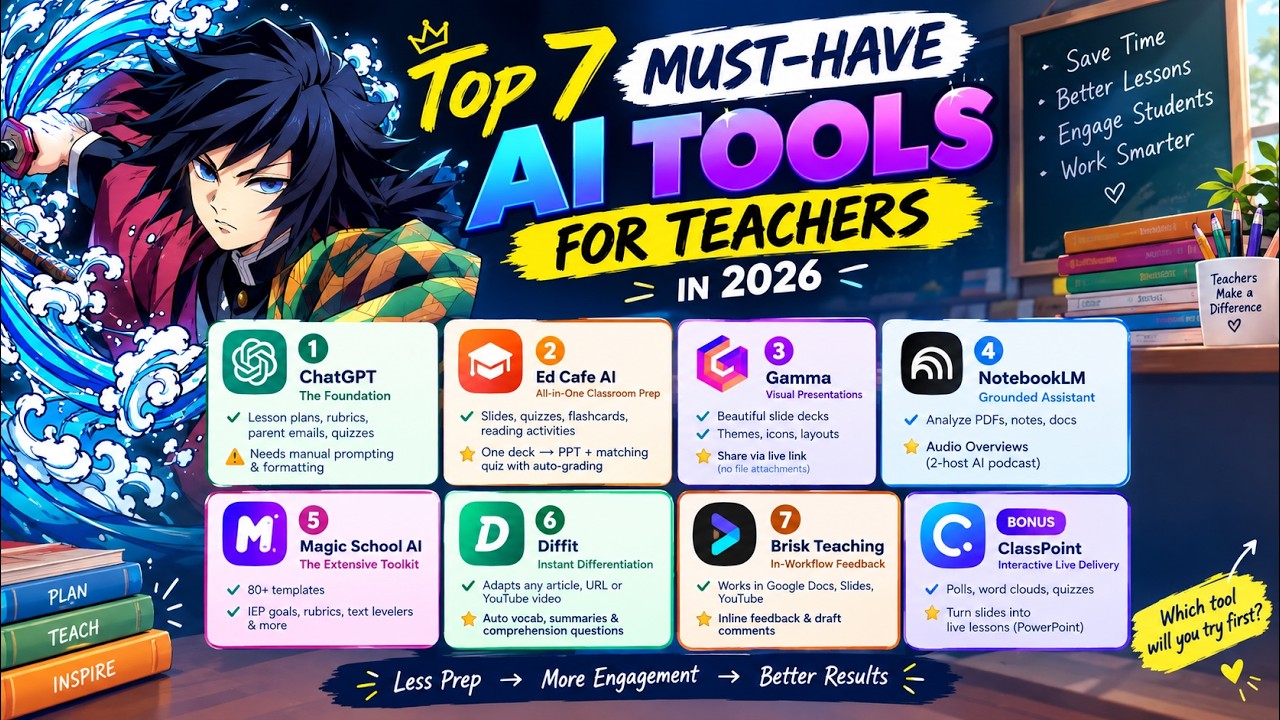
Welcome to Nexa_AI Studio🚀
Teachers are saving hours on lesson planning, grading, presentations, student feedback, and classroom preparation with AI. 🚀
In this video, discover **7 powerful AI tools** that can help educators work smarter and create more engaging learning experiences:
🤖 **ChatGPT** – Lesson plans, quizzes, rubrics, emails, and more
☕ **Edcafe AI** – Create slides, quizzes, flashcards, and classroom activities
✨ **Gamma** – Build beautiful AI-powered presentations in minutes
📚 **NotebookLM** – Analyze PDFs, notes, and documents with source-based answers
🪄 **MagicSchool AI** – Access dozens of tools designed specifically for educators
📖 **Diffit** – Instantly adapt reading materials for different grade levels
⚡ **Brisk Teaching** – Give faster feedback and create content directly in your workflow
🎁 **BONUS:** **ClassPoint** – Turn PowerPoint lessons into interactive experiences with live polls, quizzes, and word clouds!
AI isn't replacing great teachers—it can help them spend less time on repetitive tasks and more time focusing on their students. ❤️🍎
👇 Which AI tool would you try first? Comment below!
🔔 Follow for more AI tools, productivity tips, and the latest tech discoveries.
#AITools #AIForTeachers #Teachers #EducationTechnology #EdTech #ArtificialIntelligence #ChatGPT #NotebookLM #MagicSchoolAI #Diffit #BriskTeaching #GammaAI #ClassPoint #TeacherLife #TeachingTips #TeacherTools #Productivity #FutureOfEducation #AITips #Education #EdTechTools #TeachersOfFacebook #AI2026 #TechForTeachers #DigitalLearning

Through our strategic partnership with CK-12 Foundation, 45+ AI-enabled tools are now integrated into TheTeacherApp — transforming how teachers plan, personalise, and deliver learning.
This is not just technology adoption.
It is systemic capacity-building for teachers
Aligned with national education priorities, we are enabling classrooms to become smarter, faster, and future-ready.
The AI era in education has begun.
Lead it. Leverage it. Empower every learner

AI isn't going anywhere in 2026. Here are some genuinely practical ways to use it as a teacher, no specific tool required.
Generate questions — grab a YouTube link, feed it to your AI of choice, get multiple-choice questions for a lesson starter in minutes instead of hours. I've built an entire bank of these using TED-Ed videos alone.
Generate short texts — synopses, intros, blurbs for your slides. The more specific your prompt, the better the result.
Generate worksheets — short answer, multiple choice, scenario-based, all created in moments rather than an entire prep period.
Generate feedback and comment banks — sentence starters, scaffolds, and even differentiated versions of a text for different ability levels.
One non-negotiable: always check what AI gives you. Don't take the first output as gospel. Mistakes happen, and it's on us to catch them before they reach students.
Feeling overwhelmed by all the AI tools out there? Fair enough. Find the one that works for you and stick with it. Less admin means more time for the parts of teaching that actually matter.
Want to go deeper on using AI and EdTech well? Come check out the Empowered Educator Hub.
Join the Empowered Educator Hub: www.tristanheron.com/hub
Cheering you on,
Tristan
#AIForTeachers #AIInEducation #TristanHeron #EdTech #AussieTeachers #TeacherLife #EmpoweredEducatorHub #TeachingWithAI #TeacherCommunity #EdTechTips

Watch an on-demand conversation between the authors of two recent EdWorkingPapers exploring what AI could mean for the future of the teaching profession, facilitated by Review Board member Constance Lindsay.
Now that AI is an unavoidable part of conversations about education, what would it look like to center teachers' expertise in decisions about its design, implementation, and use? These two papers explore what it takes to center teachers in the design, implementation, and improvement of AI in schools. One examines teachers' perspectives and needs at scale, while the other demonstrates how structured dialogue can surface teachers' professional expertise and inform better decisions about AI. Together, they challenge researchers, school systems, and technology developers to move beyond treating teachers as end users and instead engage them as partners in shaping the next generation of teaching and learning.
-Landscape Analysis of the Teaching Profession (Pam Grossman, Maya Kaul, Sarah Schneider Kavanagh) Apr 2026 (google.com/url?q=https://edworkingpapers.com/ai26-1399&sa=D&source=docs&ust=1788879071357012&usg=AOvVaw2OtD7ytqaXolzQwmwWIWgm)
-Practitioner Voices Summit: How Teachers Evaluate AI Tools through Deliberative Sensemaking (Dora Demszky, Christopher Mah, Helen Higgins) Apr 2026 (https://edworkingpapers.com/ai26-1466)
In this video, we dive deep into how Eduaide.ai works, from signing up to generating high-quality classroom resources like quizzes, worksheets, and parent emails in under a minute. Learn how to use the "Enhancer" tool to adapt content for different reading levels and see why this is a game-changer for your teaching workflow.
If you found this helpful, please hit the LIKE button and SUBSCRIBE for more AI tools for educators!
#teaching #aiteacher #edtechtools #lessonplanning #teachingtools #aiineducation #teacher
Are you a teacher from Kerala wondering how Artificial Intelligence (AI) can make your teaching easier and more creative? In this series of videos, we’ll explore how AI tools like ChatGPT, Gemini, Claude, Deepseek, Perplexity, MagicSchool.ai, Canva AI, Quizizz, and Curipod. etc are transforming classrooms in Kerala and around the world.
You’ll learn:
What is AI (Artificial Intelligence) and why it matters for teachers
How AI can save time in lesson planning, grading, and assessments
Best AI tools for teachers – practical demos and real classroom use
How to use Canva AI for posters, ChatGPT for lesson plans, Quizizz for quizzes, and more
How to use AI responsibly and ethically in education
How AI supports inclusive learning and helps every student learn better
💡 Whether you’re a school teacher, college lecturer, or tuition tutor in Kerala, this video will help you understand how to bring the power of AI into your classroom — easily and effectively!
AI for teachers explained in Malayalam
Watch till the end for real examples and step-by-step tutorials designed specially for teachers in Kerala following SCERT & CBSE syllabus.
💬 Comment below if you want us to make tutorials in Malayalam for each AI tool!
#aiforteachers #aiineducation #KeralaTeachers #sartechlabs #chatgptforstudents #aieducation #aitools #teachers #artificialintelligence #educationrevolution #aitools2025
1.2 Mastering Custom Tools (AI for ESL Teachers Practical AI Tools)

This video is for teachers and advanced students of English as an Additional Language. It provides helpful authentic information about the use of AI,, a content passage, and the verb tense/modal system in synergy.

Even as teachers across the country experiment with AI, many are skeptical of its role in classrooms, and whether it will undermine student learning. That wariness was evident during a May workshop, part of the “National Academy for AI Instruction,” a partnership between a major teachers’ union and three tech companies, including AI developers.
The American Federation of Teachers is offering its 1.8 million members free AI training and curriculum as part of the $23 million program. Teachers said they saw promise in using AI to plan lessons but are worried about the technology undermining student cognition and critical thinking.
AFT’s view is evolving, too: The union’s president recently called for restrictions on student-focused AI tools, and for research and teacher training on safety and privacy.
---
STAY IN THE KNOW
Subscribe to our channel: https://edw.link/1ds
Newsletters: https://www.edweek.org/newsletters/
CONNECT
Facebook: https://www.facebook.com/edweek
LinkedIn: https://www.linkedin.com/company/edweek/
Instagram: https://www.instagram.com/educationweek
